Why we need a conversational agentic surface
Most health apps treat you like a data-entry clerk: you have to upload a report, fill a form, log a reading, and then wait for a signal to surface. This is reactive by design: the app waits for input while your health keeps changing.
Your body keeps its own schedule in the meantime. Glucose can shift overnight, while sleep debt accumulates across a bad week or two. LDL moves on a longer clock, sometimes for months before anything sends you back into the app. By the time you think to check, the moment worth catching has usually gone past.
An agentic surface keeps watch in between those moments. It reads your Apple Health steps, your uploaded lab reports and scanned prescriptions, and surfaces meaning before you ask.
The other thing a health app has to survive is how fuzzy real routines are. Sometimes, you might miss workouts, eat badly on weekends, travel, and find your sleep collapsing. A rigid app turns each miss into a broken streak. A conversational agent can absorb it instead, adjusting the plan when life gets in the way (it will), and nudge without scolding.
So, what we set out to propose for a large health insurance provider in India was a very specific kind of agentic experience.
The goal:
A health assistant that knows what deserves your attention early, and talks to you like someone who understands that discipline is aspirational.
The advantage of conversational interfaces
In most health insurance apps, the blood report and policy document are available somewhere in the product (sometimes in a PDF vault, sometimes buried five tabs deep).
You still have to find them, read through them, pull up an older report, check what changed and decide whether any of it needs your attention.
With a conversational interface, the agent can read the documents first, so you can begin with the question you actually have: “Is my diabetes under control?”
The agent can then show how the marker has moved and tell you whether the change needs your attention.
It can also compare last year’s report with this year’s and say: “Your LDL is up 12 points. Here’s what that means for you.”
Our premise is that a conversational interface is a better fit for a health insurance app’s younger users. They research everything digitally but have little patience for a static health surface.
Chat feels more natural to them, and they are more likely to ask about their health there than open a spreadsheet of markers.
That makes the conversational layer the primary interface, with reports and policy documents feeding it information rather than sitting at the end of a navigation path.
What is Focus
Focus is a time-bound, directional health program that we designed for you, the user, and the system to define together, then adjust as you go.
Depending on your health requirements and fitness goals, you set a Focus for a period, typically a month. The system asks about your diet, fitness preferences and current activity levels.
It also asks for the core requirement: a lab marker to improve, a weight target or a habit to build.
If your bloodwork shows elevated liver enzymes or cholesterol, the Focus might be to get fitter and improve your diet.
The system turns that into weekly step counts, protein goals, regular check-ins and a mid-point weigh-in reminder.
Setting up a Focus takes a few taps on activities and diet, then returns a dated plan down to each day’s workout and meals.
10 to 12 days in, the assistant asks: “How is the Focus going?”
If you reply, “Unable to stick to everyday runs,” it can suggest a diet-first Focus or shorter walking targets.
“Going great, but need more food choices” expands the meal recommendations. “Don’t get enough sleep” adds a sleep hygiene module for the weeks that remain.
Over the month, the user and assistant keep working through the plan together. There is a structure to it, but it is as flexible as having a conversation each time you deviate.
At a mid-Focus check-in, a plan that feels too heavy gets eased: lighter walking targets, shorter home workouts, and a rewrite of the days that were not working.
How Focus and an agentic surface organize Home around what needs attention
In a traditional health insurance app, Home is a directory for policies, claims, benefits and documents. It answers the question: “What can I do here?”
With an agentic surface, the objective shifts to a more immediate question: “What should I do right now?”
Home becomes a single, time-sensitive objective card: “This month’s Focus: bring fasting glucose under 100.” The trend line from your last upload shows up underneath it, along with a note that your step count has dropped 18%, and a one-tap action to book the follow-up test.
This works because it respects attention: younger users can begin with what matters now, one objective at a time, without having to parse a full dashboard first.
The page remains fairly quiet until new information arrives. An uploaded report, a wearable sync or a completed milestone updates the card with the change that needs attention and the action attached to it.
Each card opens the conversational health assistant with the context already loaded. Tap the glucose trend and the chat begins here: “I see your fasting glucose is trending up. Want to adjust your Focus?”
Anything recurring, such as a medicine schedule from a scanned prescription, becomes a docked widget on Home, where it remains visible throughout the day.
The wider navigation is still available, while the first screen behaves like a living briefing for your current health goal.
Reading health documents in a conversational interface
The moment you upload a blood report is where most apps fail you: they say “Saved to records” and leave you alone with a PDF full of numbers you may not understand.
In the agentic interface, the agent begins working on the report immediately.
Extraction: It reads more than 30 markers, including your glucose, lipid, liver enzyme, thyroid and CBC levels, and places them against your earlier results.
Contextual insight: It leads with the changes that need attention: “Your HbA1c is 6.8, up from 6.2 six months ago. That has moved out of prediabetes and into the diabetic range, which needs a doctor’s review.”
Proactive linkage: If LDL is elevated, it can suggest a cholesterol Focus and surface an available dietitian consultation. If TSH is off, it can flag a thyroid follow-up and check whether your policy covers endocrinologist OPD. The assistant can also suggest a custom Focus from the report, linking Health directly with a Wellness action.
Plain-language summary: A readable paragraph sits above the raw data, written like a note from a health-literate friend.
In this flow, you never open the PDF. You chat with the assistant about what the report means, and it connects the meaning to action.
A blood report goes in and comes back translated: the borderline LDL flagged, the GP-versus-cardiologist call explained, an in-network doctor surfaced, and the diagnosis left to a doctor.
Setting up Focus from the conversational interface
You open the assistant chat and type freely: “I want to lose 8 kilos before my sister’s wedding in December.” No forms. No dropdowns.
A plain sentence, "lose 8 kilos before a December wedding", becomes a Focus: the assistant checks the pace against the goal, offers a diet-only or diet-and-workout choice, and builds a plan.
Intent parsing: The agent pulls out the goal (weight loss), magnitude (8 kg), deadline (December) and context (a social event).
Persona match: It checks your existing health data, including your current weight, activity level and any conditions that may affect the plan.
If you have flagged knee pain, for example, it avoids building the plan around running.
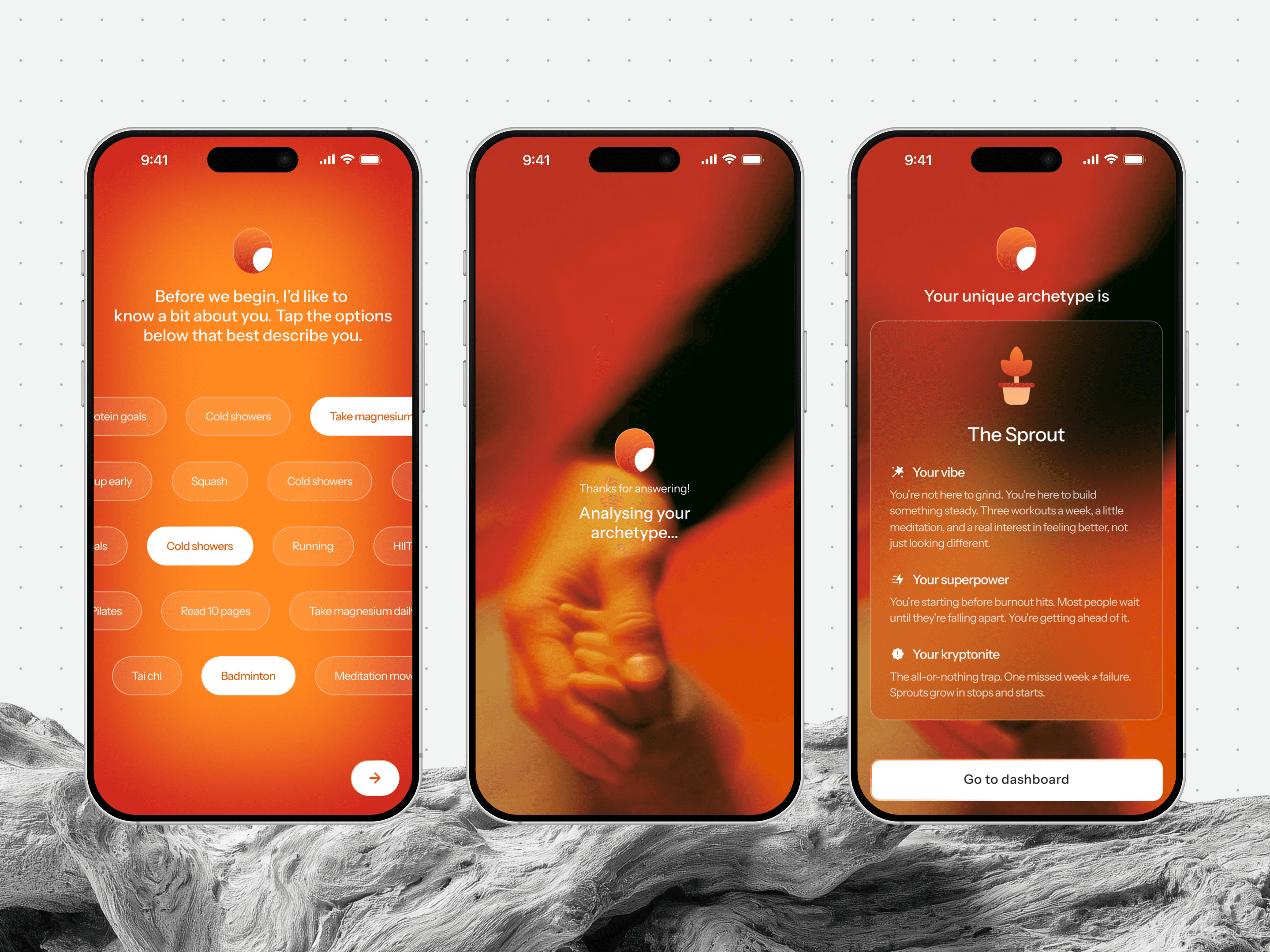
A short onboarding turns a few taps about habits into an archetype, The Sprout, summed up as your vibe, superpower and also, your kryptonite.
Focus assembly: It proposes “Sustainable weight management: 8 kg by December.” The plan includes weekly step counts, protein goals, regular check-ins and a mid-point weigh-in reminder.
One-tap activation: Once you confirm, the Focus appears on Home, adds the relevant habit tools and schedules the first nudge.
Adaptive continuation. Two weeks in, if you miss two step targets, the chat can ask: “Your step count dropped. Want to switch to a diet-first Focus?”
The assistant uses the Health data already inside the app to shape the recommendation. You never see a separate “Create Focus” form because the system structures the work behind the conversation as you talk.
Reading prescriptions from scan to daily dose
You upload a prescription photo after a doctor visit. The system extracts the medicines, dosages and duration, then uses that information across the rest of the app.
A scanned prescription comes back as medicines, dosages and timings, a flagged item to review, a one-tap order, and a weekly dose schedule docked to track.
Recognition: It checks the medicines against your existing history and flags possible duplicates or contraindications for a doctor or pharmacist to review.
Fulfillment bridge: You see an “Order these on 1mg?” card with a pre-filled cart and an estimated delivery time that evening.
Medicine box widget: Once the prescription is parsed, the system automatically sets up a medicine calendar on Home.
The widget shows the day’s doses, marks each one as taken or remaining, and updates whenever you confirm an intake. Because it is docked on Home, it stays where you can see it every day.
Adherence loop: Three days later, a gentle reminder arrives through WhatsApp or the in-app chat: “Metformin: 2 of 30 days done. Tap to confirm you took today’s dose.”
The prescription becomes a task list with logistics attached, and the agent uses it to bridge the gap between “doctor said” and “medicine in hand.”
Health tools and widgets that appear when needed
Health conditions develop through daily choices around hydration, diet and monitoring. Knowing your blood pressure may be curiosity at twenty; it becomes essential as you age.
Regular readings over time give you a clearer picture of your heart health. Staying well comes down to habits: what you do and what you track.
An agentic surface makes these tools easier to use by carrying some of the remembering.
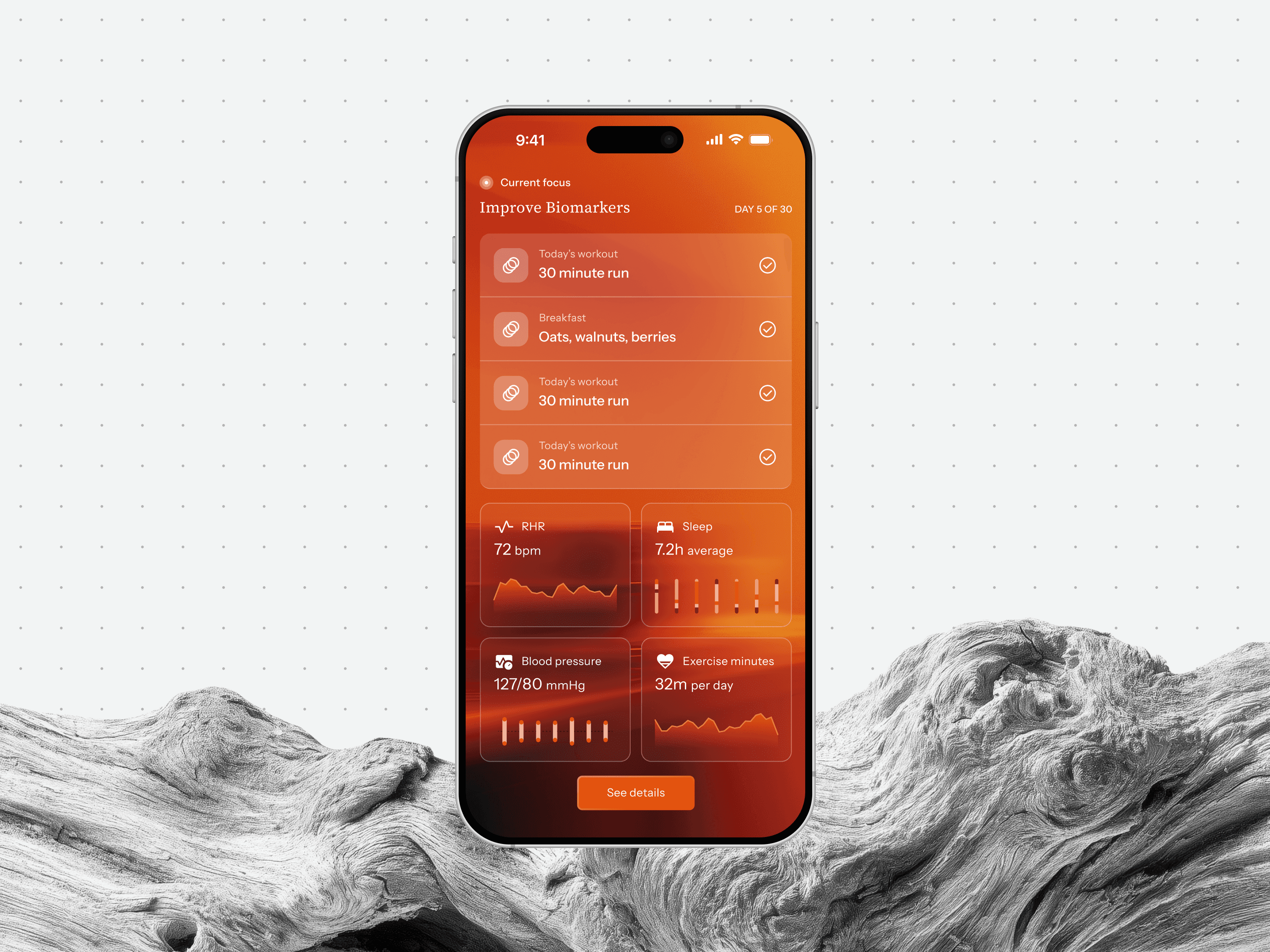
Here the home screen displays the current Focus, 'Improve Biomarkers', for day 5 of 30. It also includes the day's workout and meals and the biomarkers it tracks.
The agent knows when you last logged your BP and whether your Focus includes cholesterol management. When you open the app, it can bring up the BP monitor with that context:
“You haven’t logged BP in 10 days. Your Focus includes heart health. Quick reading?”
Each tool does a different job inside the same loop:
BP Monitor: Logs readings, flags changes from your baseline and relates them to your Focus targets.
Activity Tracker: Pulls data from Apple Health or Google Fit, shows trends and warns when your step count falls below the Focus target.
Diet Tracker: Logs meals, checks protein intake against the Focus and suggests adjustments.
Heart Rate Tracker: Logs resting heart rate, flags unusual readings and connects them with the relevant cardio Focus modules.
The agentic layer gives each tool a reason to appear at a particular moment. A BP monitor is just a form until the agent says: “Your last report flagged borderline hypertension. Track this weekly?”
These tools behave like interventions: they appear when there is something to do and move back once the action is complete.
What this does for an insurer
Everything above depends on data the insurer already holds. The claims history, the policy terms, the uploaded reports and the wearable permissions usually sit in health insurance apps for years, doing very little between renewals.
An agentic layer is a decision to speak from that position rather than store it, and raises the standard the product is held to.
An app that volunteers an observation about your thyroid has accepted a duty of care that a document vault does not. It is the main reason that can make a policyholder view a health insurance app as a support system, and make them want to open a health insurance app once a month, when absolutely nothing has gone wrong.