


Design studios have always bought most of their tools. Sketch, then Figma, and whatever the latest plugin was. These products are built around the work a studio ships: making and reviewing interfaces, trying out interactions, keeping design systems coherent, and handing the work across to the people who will build it.
A studio's internal systems are more particular.
They carry project context from one conversation to the next, keep research from disappearing into folders, and preserve the reasoning behind standards from being reduced to “that’s how it’s always been done.” Much of this lives in a studio's habits, its documents and the heads of people who have been around long enough to remember how it all fits together.
At Canvs, we have always built around the edges of that problem. Years ago, when resizing something in Sketch could turn 16 pixels into 16.5, we spent a weekend writing a plugin that rounded everything back to whole numbers. Internal tooling has often looked like this: one sharply specific fix, made by the person who understood the irritation well enough to solve it.
Over the past few months, as working with agents has become a part of the studio’s everyday practice, internal tooling has become a more deliberate layer inside the studio.
We are building these tools from within the work so that much of the context comes along with them. They meet a Canvs project with its history and working rhythms already in view, which saves us the labor of explaining it all over again.
The work gets faster, of course, and we spend less time making the same decisions twice. Over time, the studio also retains more context across projects and turns what it learns into shared capability. Work that would once have required a product team of its own can now become a part of running a 30-person studio.
We wrote about the practice behind this in Going Agentic as a Studio. Here are the tools that have come out of it, and what they have begun to change about the way we work.
1. Omni: Building an in-house toolkit for the way we design
The first screens of a project carry decisions that will last much longer than they do. Color, type, elevation and tokens have to work together and meet accessibility standards from the start.
Arjun Rajkishore (Product Design Principal) built Omni at Canvs for this part of the work. It began as an accessibility tool that could generate color palettes and type scales, add elevation, then tokenize the result directly in Figma.
The accessibility work goes further than a single contrast score. Color pairings can be examined across different color-vision conditions and WCAG standards in one place, with enough information for a designer to revise the system before it spreads across every component.
Omni has since grown into a suite of micro-tools, organized into larger buckets around different parts of studio practice. Design systems are one such bucket. Arjun is also building a mockup maker with real 3D devices and a shared resource library.
More buckets are being explored for generating and reviewing design work. The broader direction is to gather tools we repeatedly reach for across projects, with the studio’s own standards already built into them.
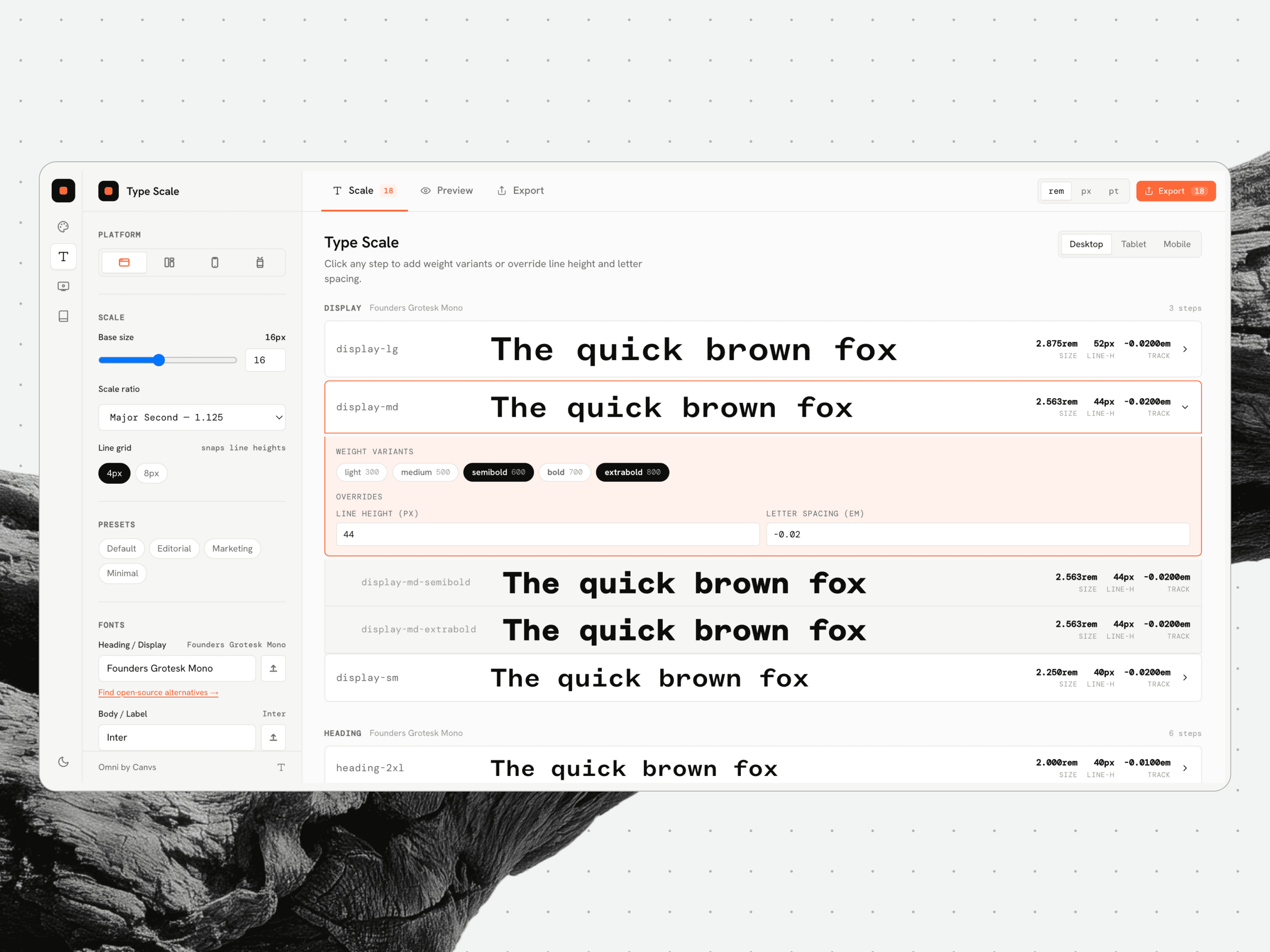
Omni’s type scale view sets each step’s size, line height and weight variants once, then exports them as tokens.
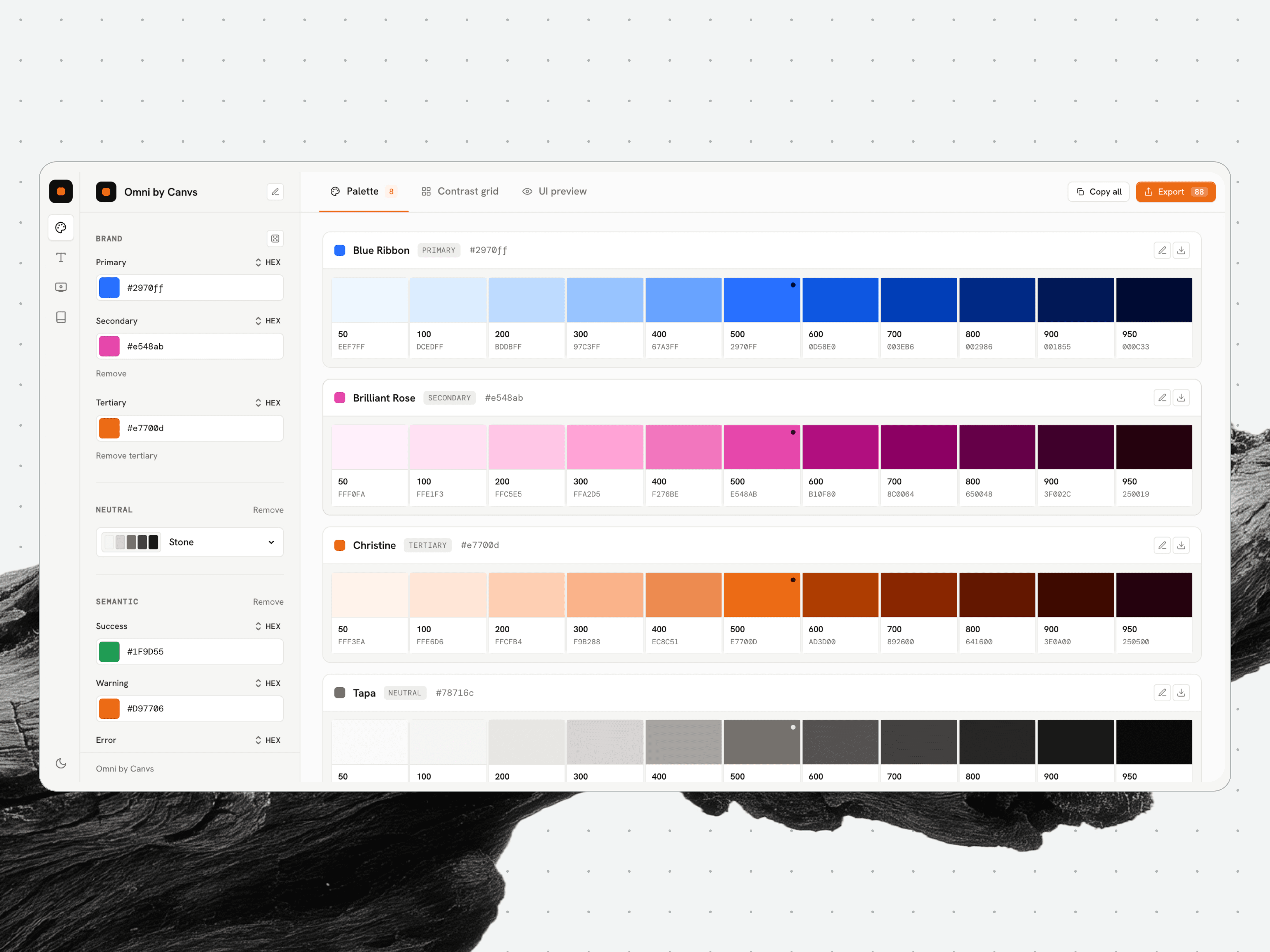
A full tonal range, 50 through 950, drawn from each brand colour, with hex values ready to export.
2. Prototyping in code
Figma click-throughs have long been the default way to present how a product should work. They can show a linked sequence of screens, while anything functional usually requires a development team and enough time for a separate build.
Code sometimes enters earlier, when we’re trying out box structures and working through an idea, but the design itself still happens in Figma. Once the screens are ready, we use a process we’ve spent time refining to reproduce them 1:1 in code.
Working in code changes what can be reviewed and how the work is presented.
Edge cases appear as the team moves through the product, including states that separate screens can leave unexamined.
Micro-interactions can be adjusted in context and saved as patterns for future projects.
Clients can backtrack or choose another route during a presentation without somebody having to restart the flow. (In fact, several clients have asked how we achieved that level of finish in a prototype.)
After the review, a well-set-up prototype can become a starting point for development. Our developers or the client’s team can inspect and audit the AI-generated code, then carry a working version of the interface and its intended behavior into the build.
A working prototype of an onboarding flow for major insurance pitch, built in code so the review could move through it at the pace of the live product.
3. Running the studio without drowning in notifications
Running a distributed studio means information reaches us from a dozen directions at once. Figma comments, Slack threads, client email and project updates all arrive as notifications; Premankan Seal (Chief Design Officer) built a system that sorts out which of them deserves attention.
Daily digests
Every morning, a briefing lands in Premankan’s inbox with what occurred while he was offline. It is filtered and grouped by project, and carries enough context to show him what needs attention.
A second 60-sec read that tells him whether the studio is moving as it should, arrives at the end of the day with what was resolved, what remains open and where the work is getting stuck.
This context-aware curation is what’s valuable. A comment on a shipped file drops out, while one on an active screen with a live client thread gets surfaced first.
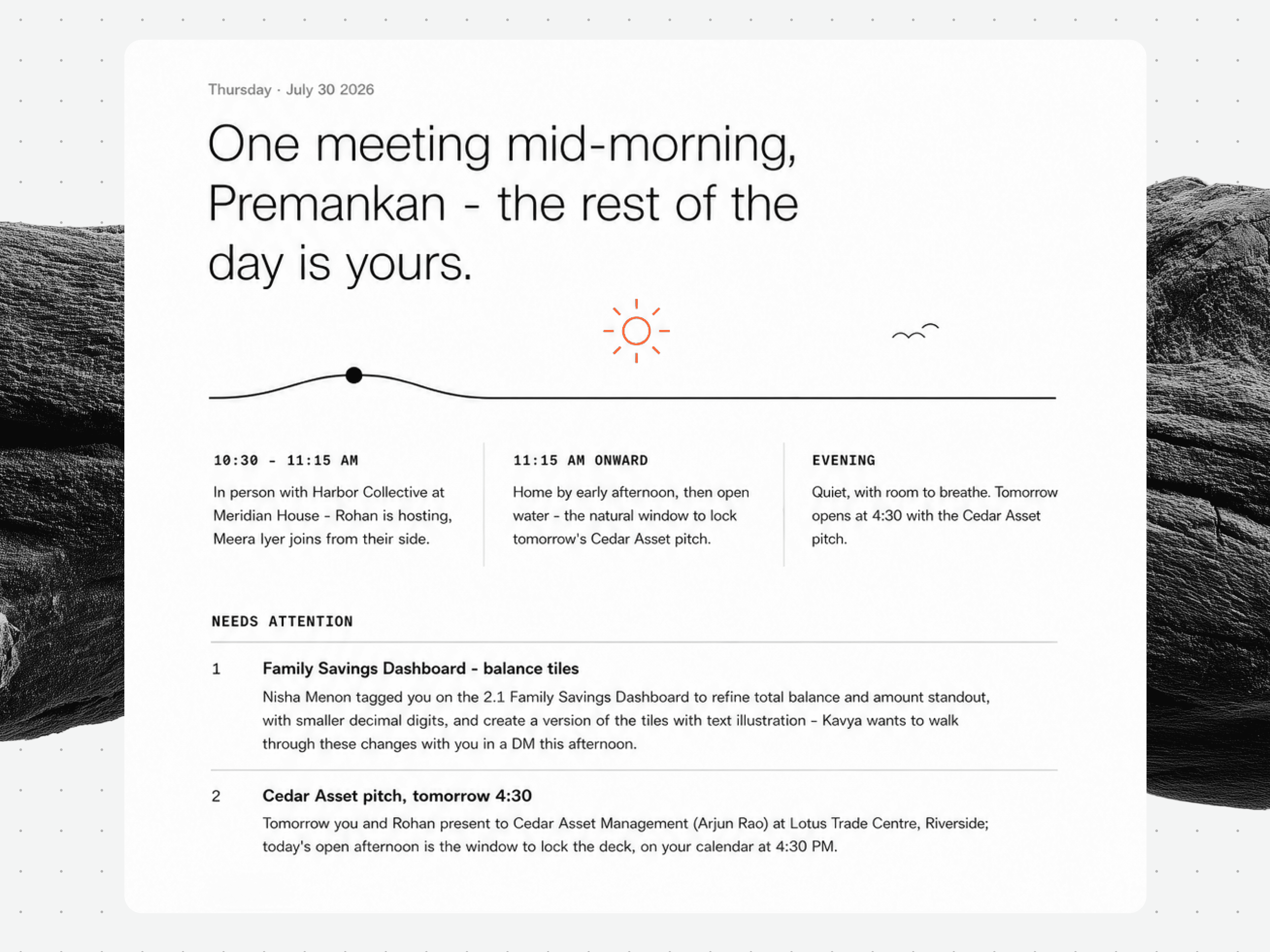
The morning digest lays out the shape of the day as a single timeline, then a Needs Attention list of what is genuinely waiting on a decision, the items already resolved, and the comments that came in on Figma.
Figma as a source of truth
Designers live in Figma, so the pipeline treats it as a first-class source.
It pulls comments across every active project file, groups them by file and project, and tracks whether a thread is resolved, stale, or heating up.
A client comment sitting unanswered for 24 hours gets flagged. A thread with multiple replies and no decision gets surfaced.
Premankan still opens Figma constantly, because that is the job. He just knows what he is looking for when he gets there.
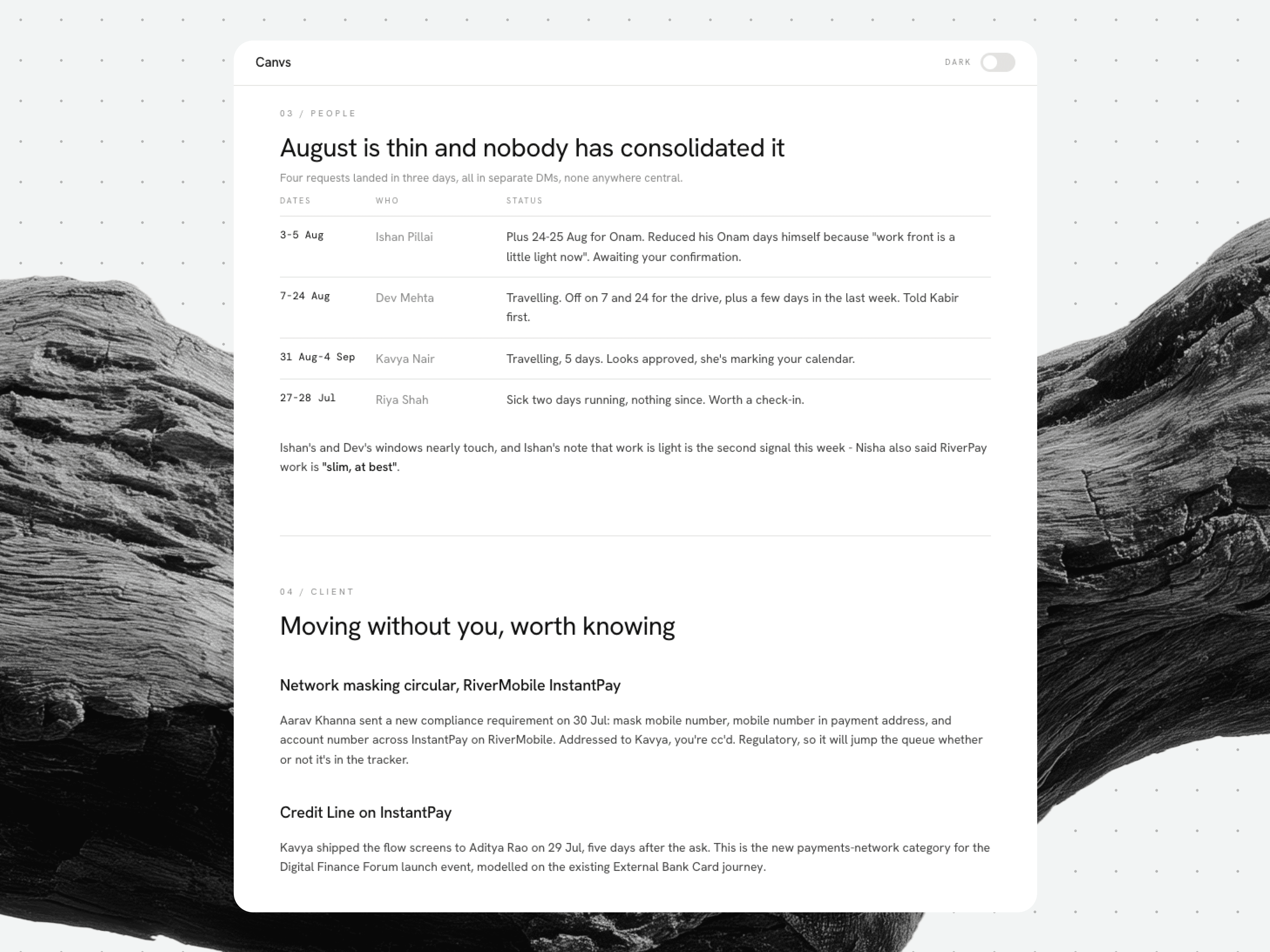
A dated action brief that gathers what would otherwise sit in scattered threads: leaves for the month, client-side changes, and the small items waiting for a call.
Slack and email as signals
Slack contributes summaries from active project channels (multiple participant threads, shared files), while email is narrowed to client-domain senders on threads tied to work in progress. A generic newsletter gets dropped while a conversation tied to a live sprint makes the morning briefing.
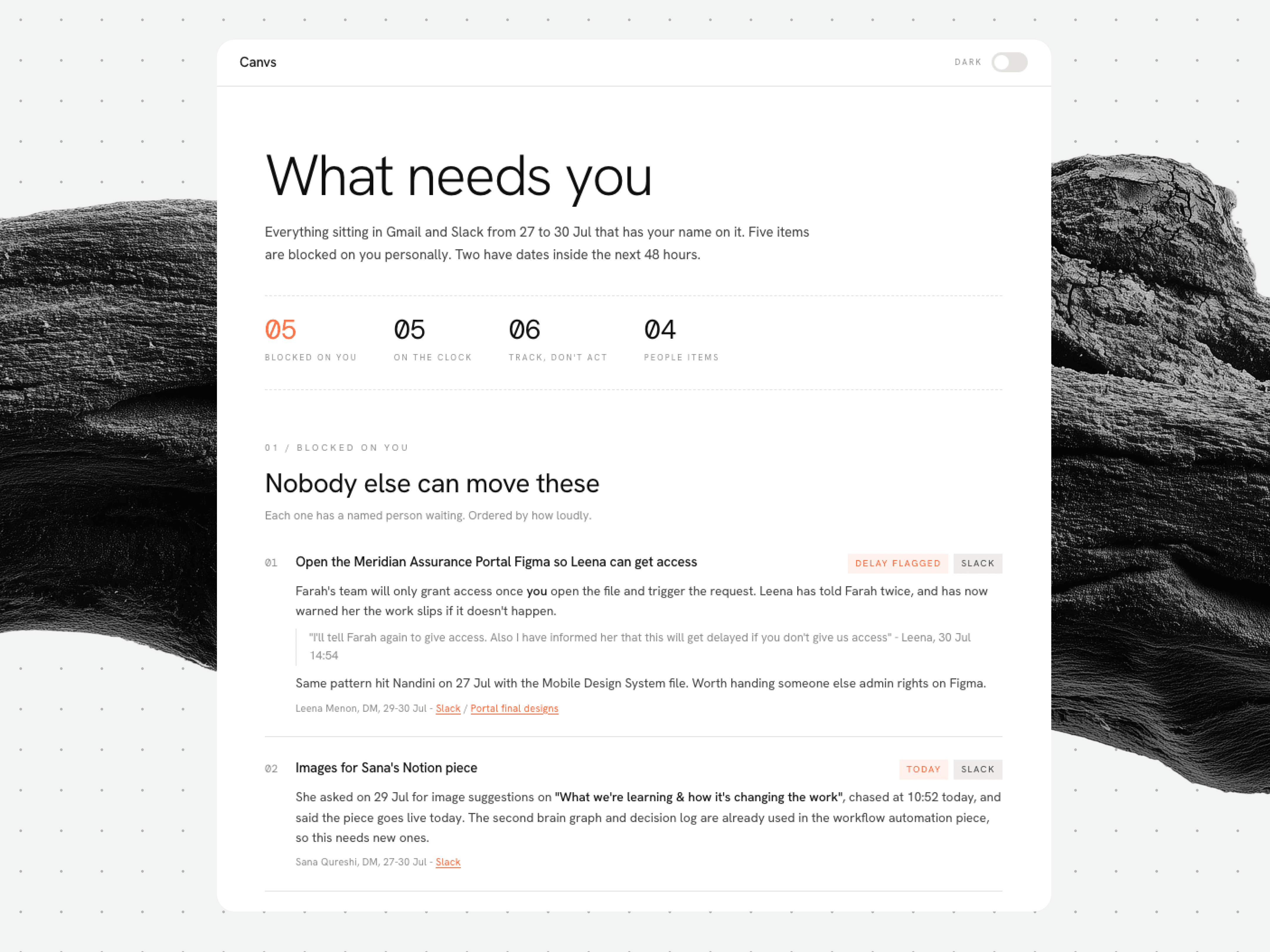
The 'What needs you' view sorts everything in Gmail and Slack with Premankan's name on it into what is blocked on him, a stalled Figma access request first, what is on the clock, and what to track but not act on.
What this actually gives us
We still have standups, because talking to each other is most of the point. The difference is that they can begin with the problem, since the status is already in Premankan’s inbox by the time everyone sits down.
In his words, this is where agentic workflows are useful: “cutting the administrative tax that used to eat the hours we could’ve spent on judgment calls.”
4. Building a living research library
A studio that only executes goes stale quickly. We need to know what is moving in our field, what our clients’ competitors are shipping and where design and technology are heading, so we built a research pipeline that keeps looking whether someone remembers to start it or not.
Scheduled research that stacks
Research jobs run independently, on a repeating cadence. Some scan broadly, across fintech UX or the week’s big publication design writing; others are narrower, following a particular competitor’s release and the response to it online. Everything they find drops into a shared pool.
From collection to compounding
Collection alone is worthless. The real work happens in synthesis.
Each new finding is placed against what we already hold. Supporting evidence strengthens an existing thread, contradictions are flagged, and patterns across sources become subjects worth following.
Older material stays in play as the library grows. A report from six months ago can become useful again when this week’s competitive intelligence confirms what it predicted.
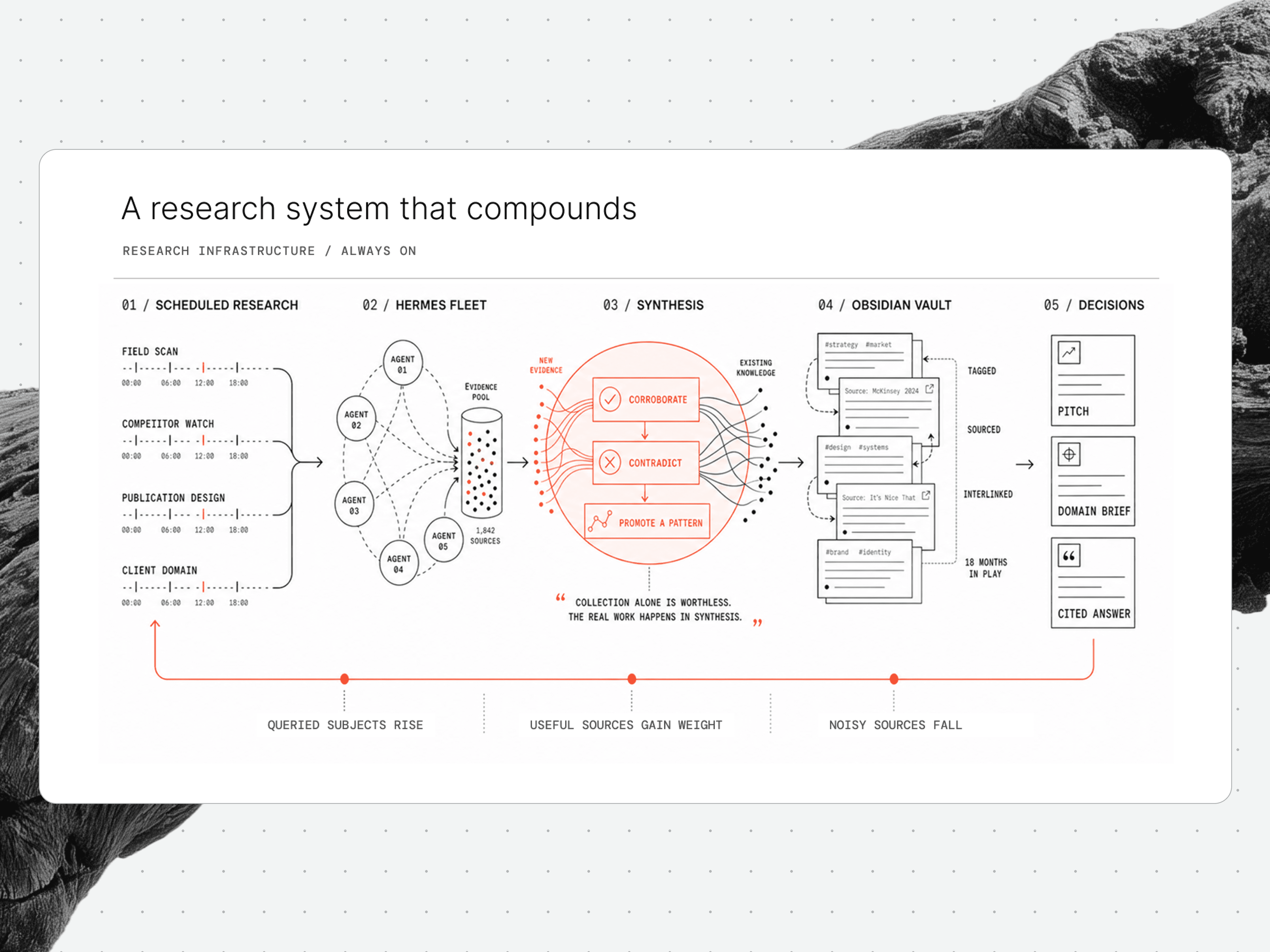
Scheduled scans feed one evidence pool, synthesis corroborates, contradicts or promotes each finding into the vault, and querying reweights which subjects get scanned next and which sources are trusted.
LLM wikis and structured memory
The material ends up in a tagged, sourced and interlinked knowledge base. When we are preparing for a pitch or briefing a designer on a new domain, we can query that history directly.
Ask “what are the onboarding trends in Indian fintech,” for instance, and the wiki draws from 18 months of research, giving greater weight to recent and reliable sources with citations attached.
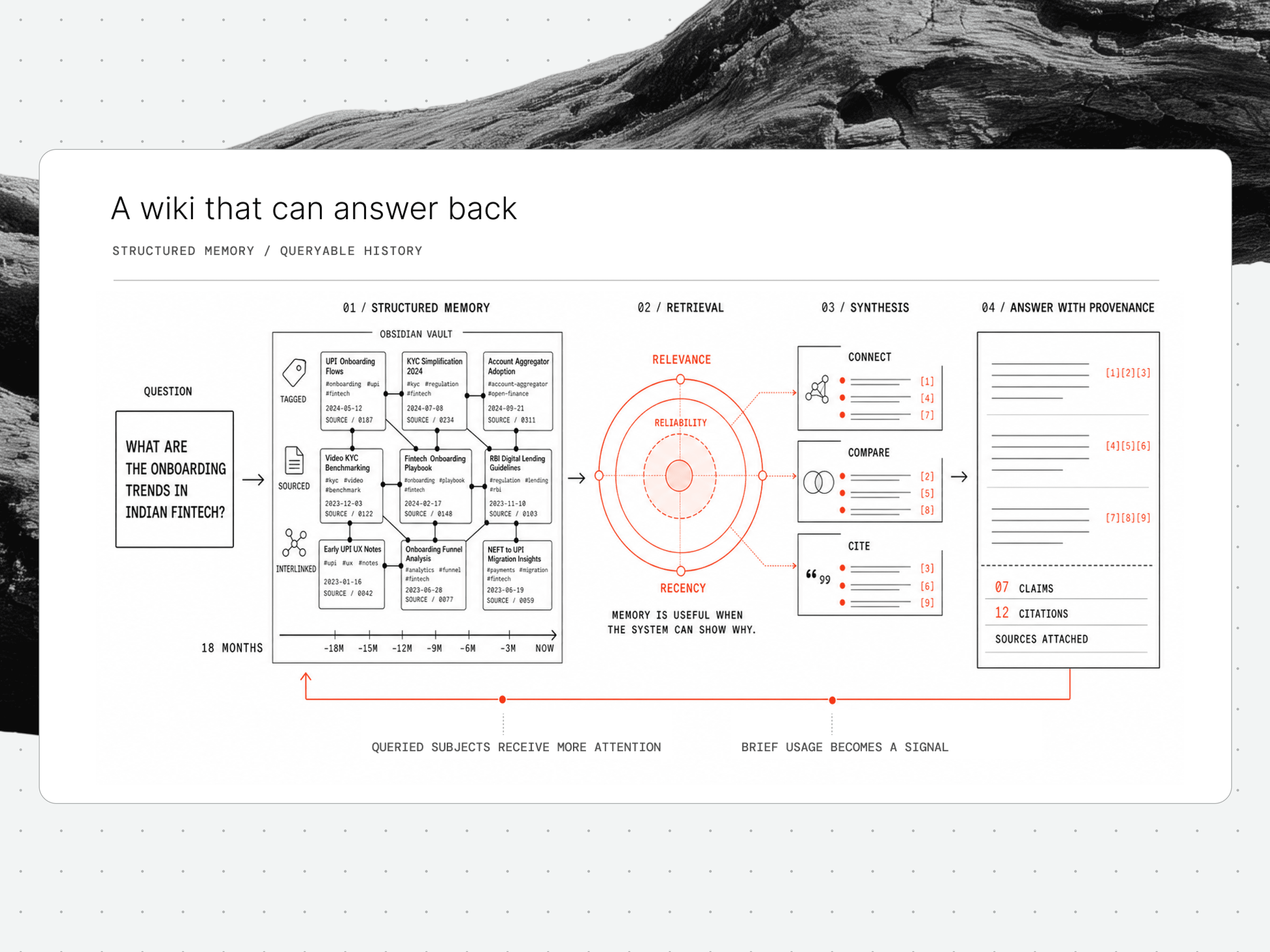
A question runs against months of tagged notes, weighted for relevance, reliability and recency, and returns as an answer where every claim carries its citation.
The feedback loop
The pipeline also learns what we actually care about. Subjects we query or carry into a brief receive more attention, while sources that repeatedly waste our time fall down the order.
What this gives us
Most studios research reactively, scrambling when a client asks a question or a competitor ships. Our pipeline collects and structures material in advance, leaving us enough time to interpret and decide. It gives a small studio the research depth to compete on strategy as much as execution.
5. Research to HTML: branded, published and hosted documents
Across projects, pitches and sometimes just arbitrary rabbit holes, we end up consuming a lot of secondary research. We bring it together so it stays organised and can be shared within the studio or with people outside it. Markdown works well while the research is taking shape, but it is not always the form we want for a finished Canvs document.
We have set up an agentic skill that takes a research document, turns it into HTML and applies the studio’s visual identity. It supports light and dark modes, with base, vertical-navigation and horizontal-navigation layouts. You can also use only half the pipeline and take the styled HTML without hosting it.
The skill is a precursor to the internal research library being built at Canvs. The larger plan is for reports from across the studio to sit together, with an authenticated agent able to publish new research directly.
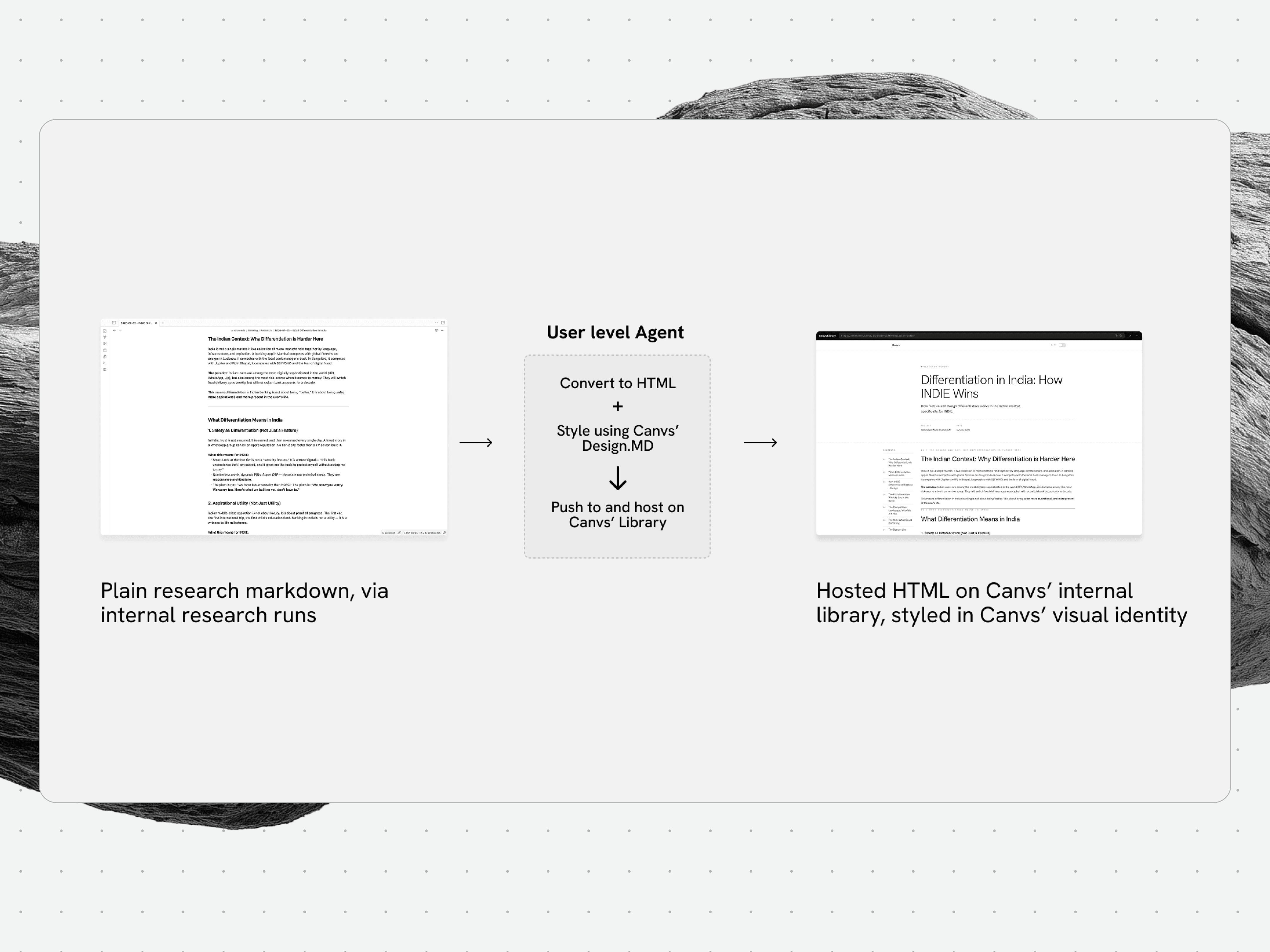
The publish pipeline end to end: plain research markdown from an internal run goes to an agent that converts it to HTML, styles it against Canvs’ Design.MD, and hosts it on the library.
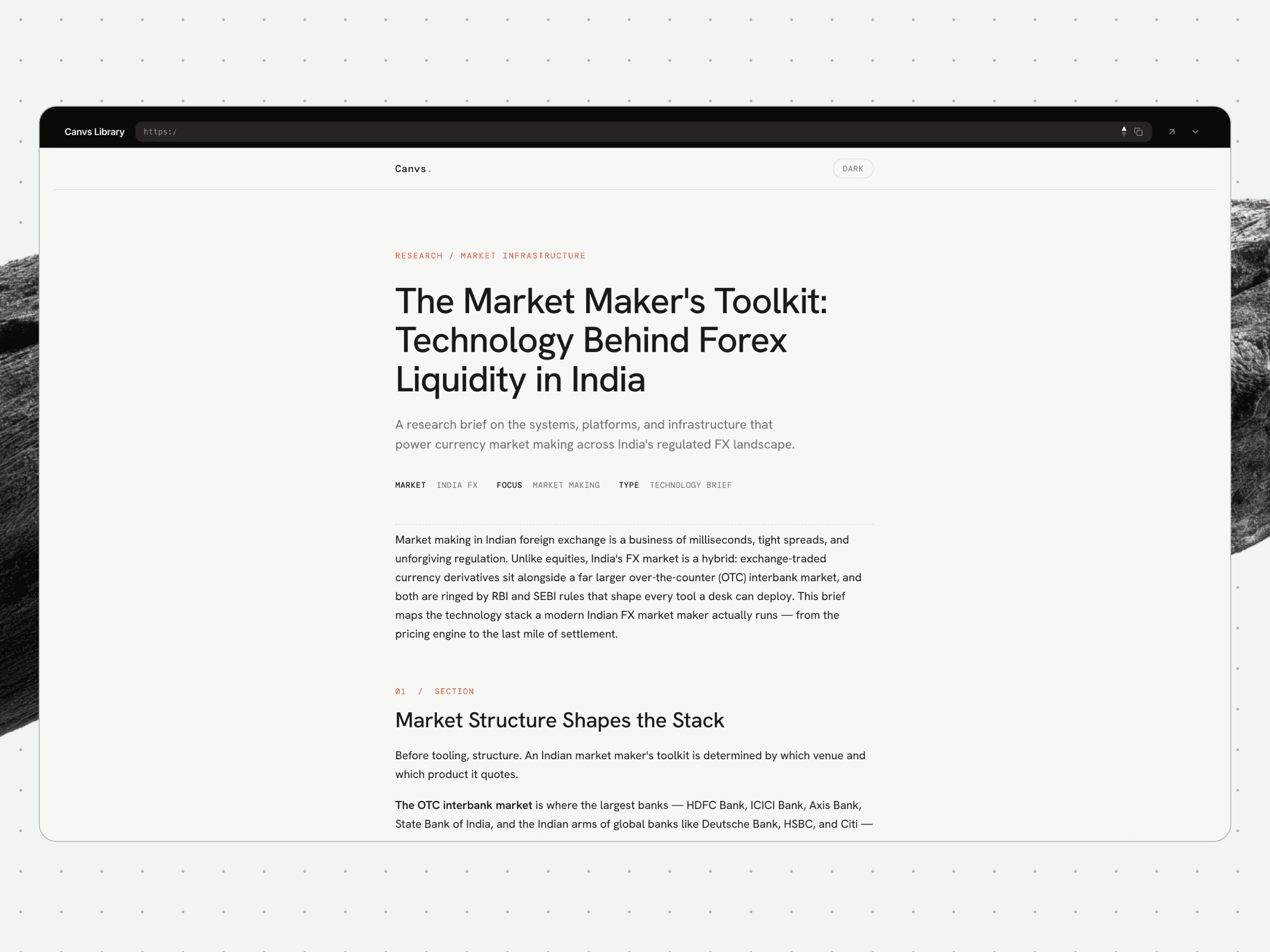
A published study in the Canvs template, opening with its research section, market, focus and type, all set in the studio’s own visual identity.
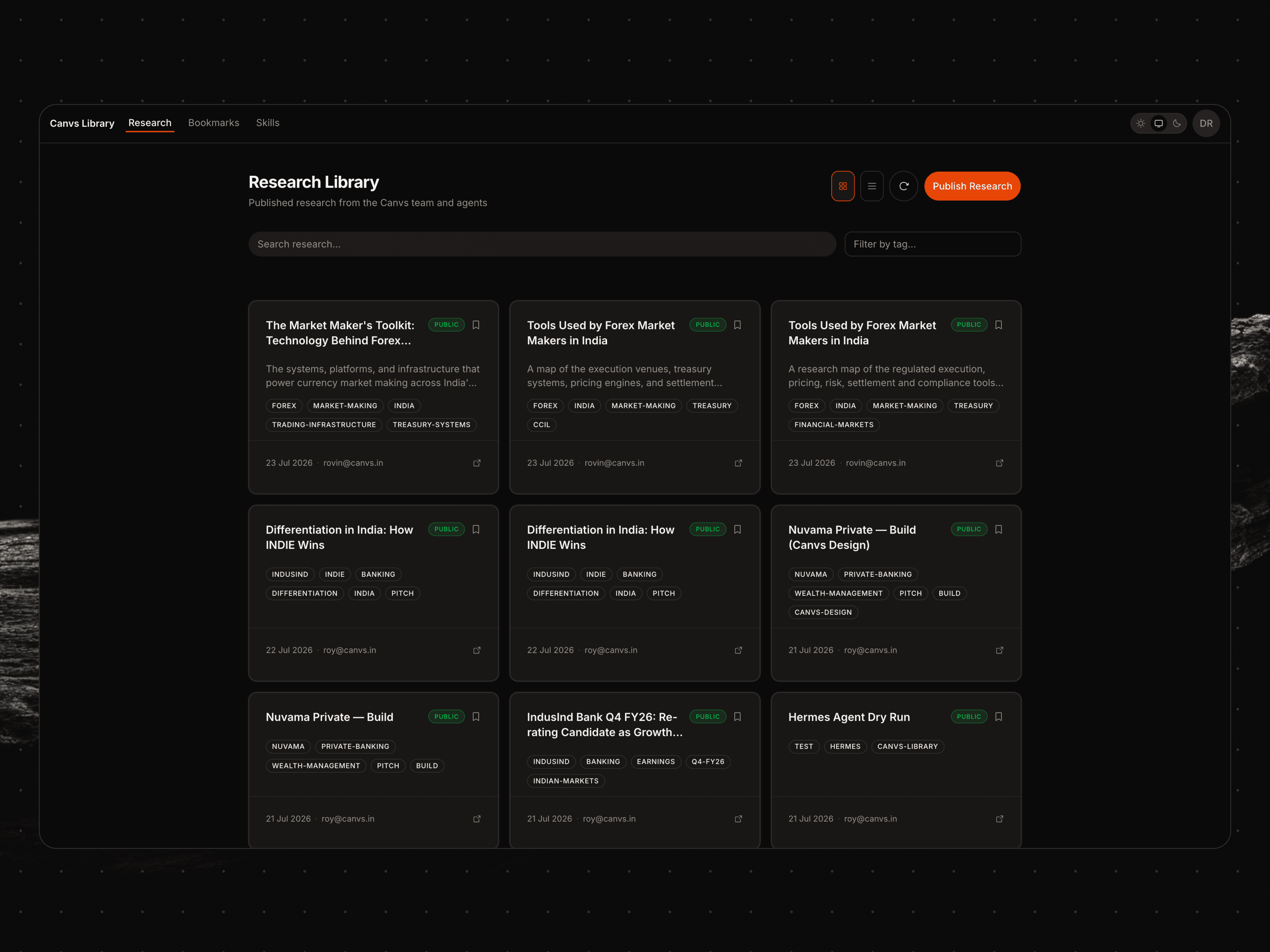
The research library lists every published brief as a tagged, dated card, from the team and from agents alike, searchable and filterable from the top of the page.
6. One login across Canvs tools
As more apps are built inside Canvs, each one eventually reaches the same two questions: who is using it, and what should they be allowed to do?
Answering them separately would leave people with multiple accounts and the studio managing access in several places.
Rovin Cutinho (Chief Product Officer) built a shared authentication service for people using Canvs tools and for agents working on their behalf.
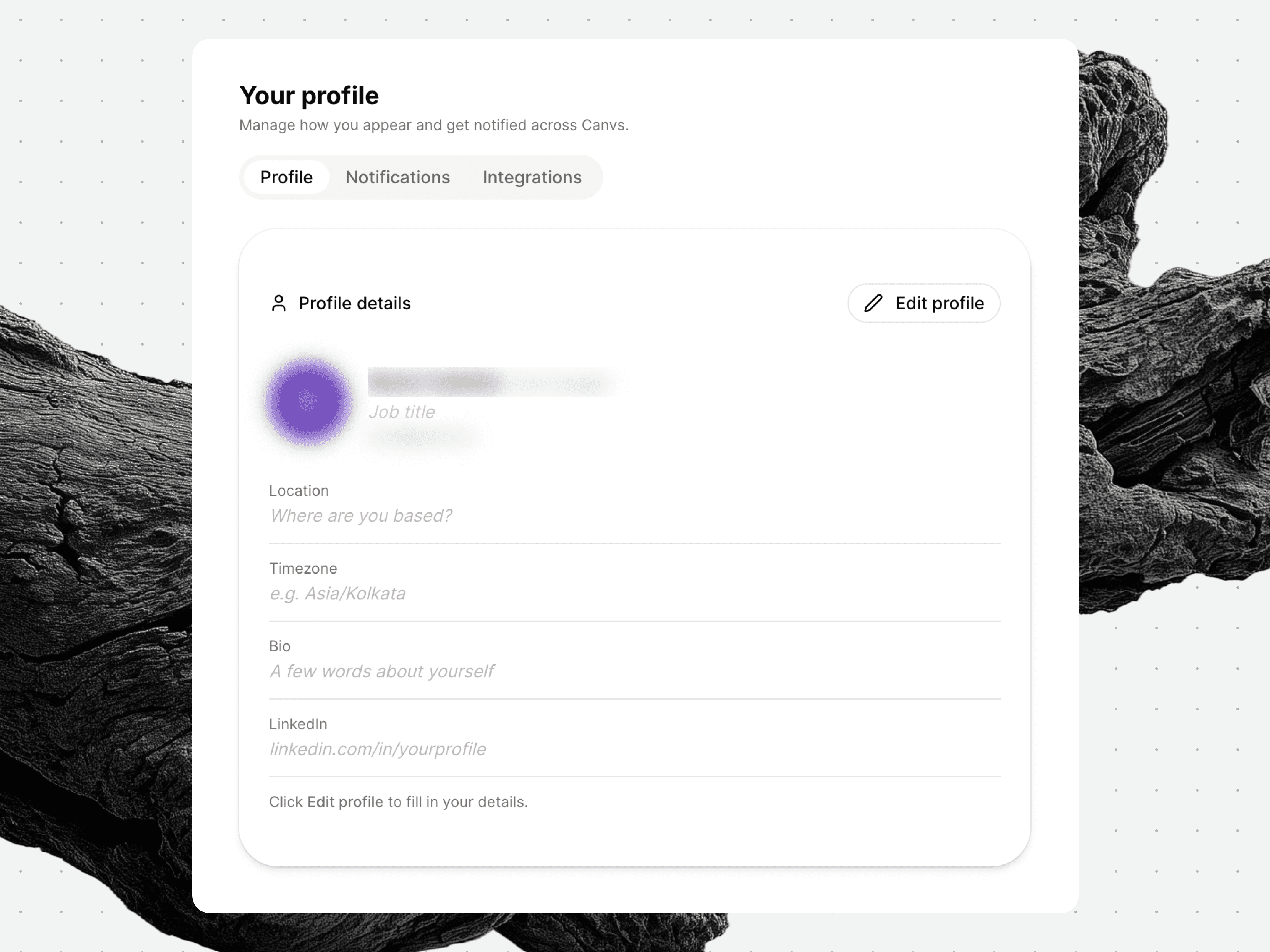
One profile every Canvs app reads from, with name, role, timezone and links set once instead of re-entered in each app.
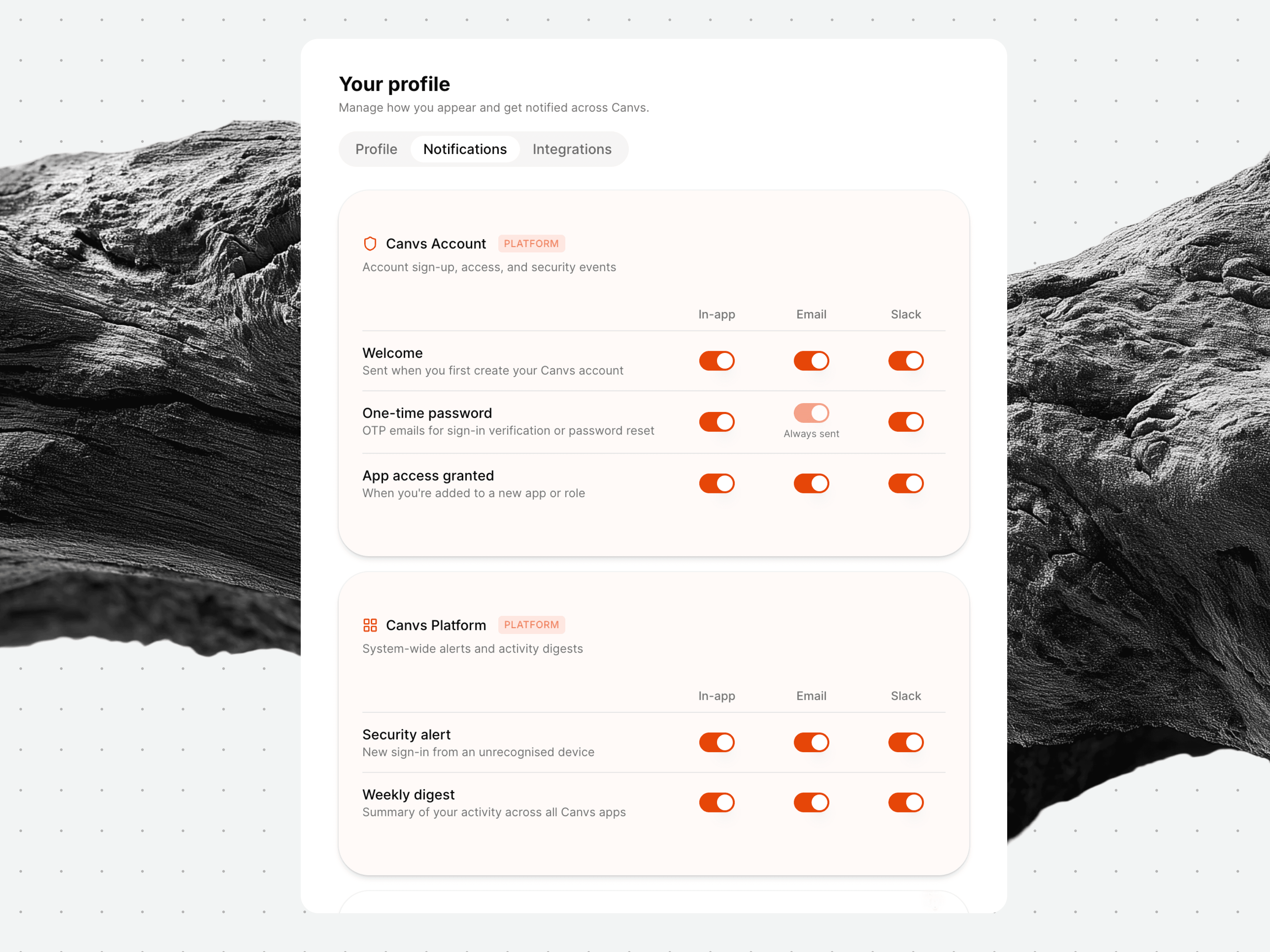
Account events, sign-up, one-time passwords, new app access and security alerts, route to in-app, email or Slack from a single notifications tab.
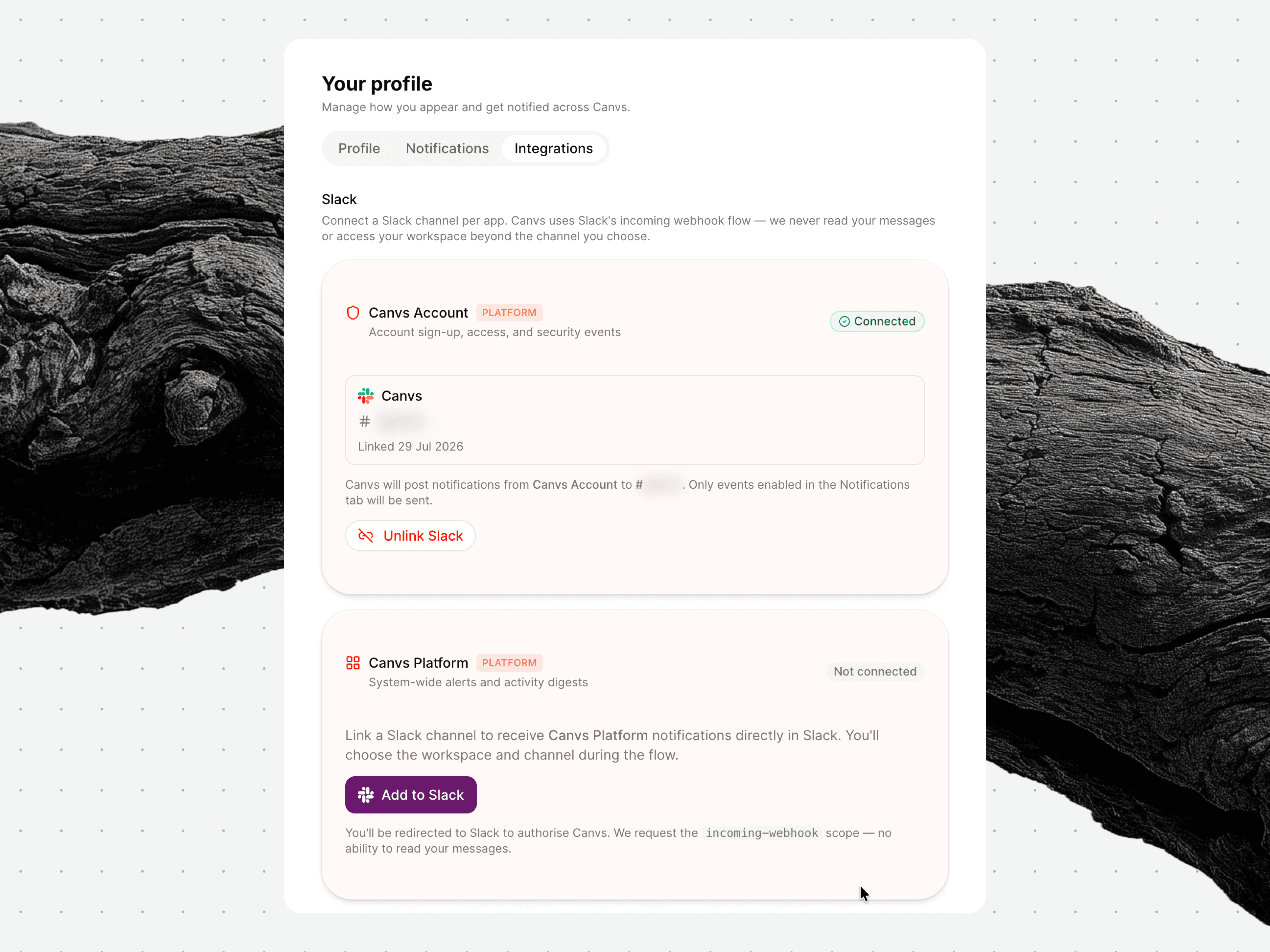
Each app connects its own Slack channel, so its notifications land in the right place.
Across connected apps, people see a familiar sign-up and sign-in experience, with identity and access managed from one place.
Authentication confirms an identity, while authorization lets each app decide what that person or agent can see or change.
Underneath is AWS Cognito, with Google sign-in and account emails already wired in.
Since the setup is written as code, we can reproduce it across staging and production. Future Canvs apps can reuse the same foundation, and it can be set up quickly for another company with its own group of apps.
Omni was the first app moved onto the service. It now uses the shared login while keeping its own permission rules.
The service is live and will evolve as more apps bring different access requirements. With identity and permissions already handled, the person making the next Canvs tool can concentrate on the problem they set out to solve.
7. Building a finance tool around the way the studio works
Finance work at a studio happens throughout the year, but the records can exist in separate places.
A card charge may appear in one system and its invoice in another, while payroll and compliance follow their own schedules. These records have to be kept aligned so every transaction has an explanation.
Finance software built for many kinds of companies can carry more than a studio like ours needs. So, Rovin has been building this tool around the finance and compliance work Canvs actually manages.
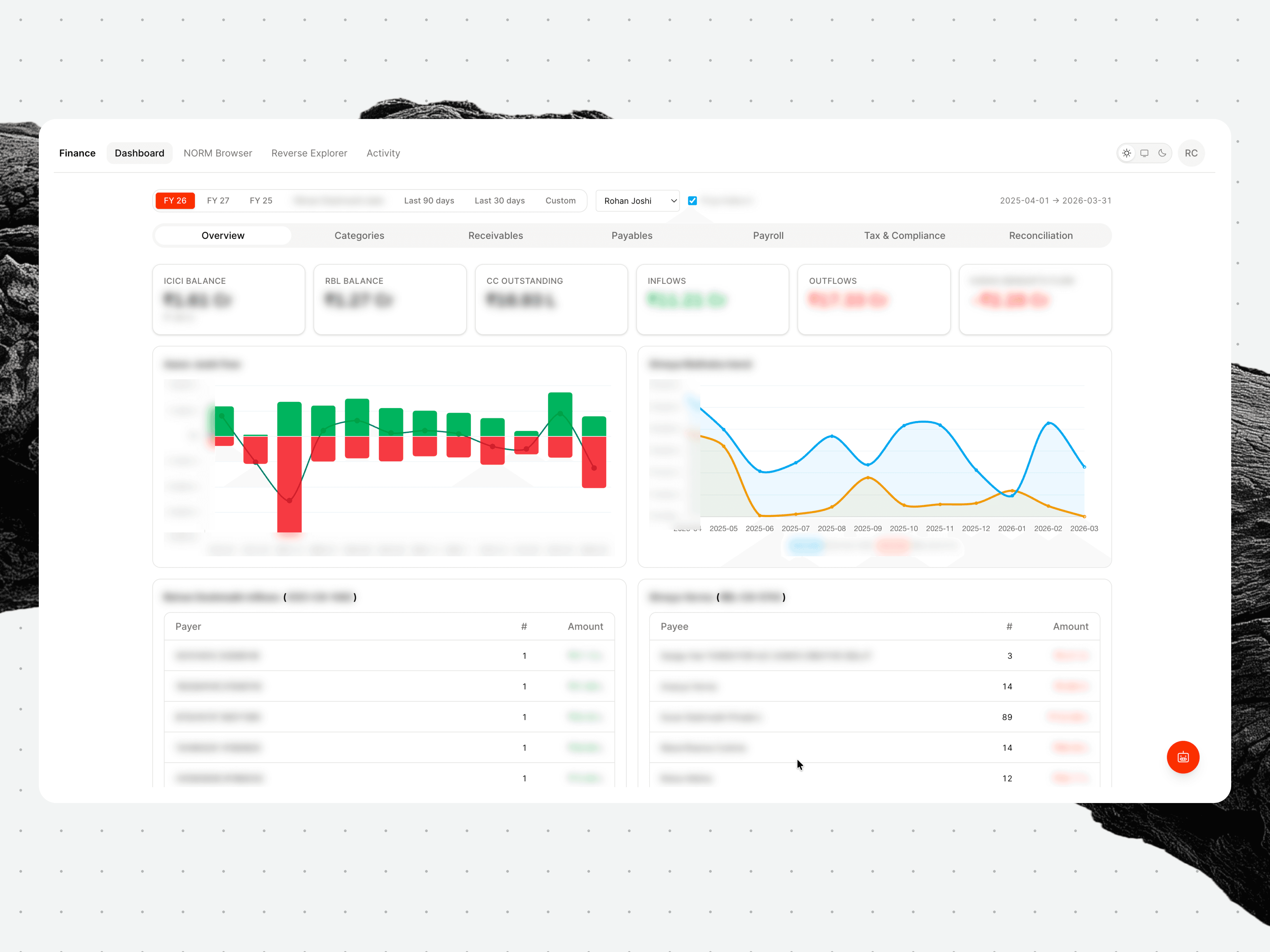
The dashboard reads balances, inflows and outflows straight off the reconciled ledger, so one screen holds what usually sits across separate bank and card statements.
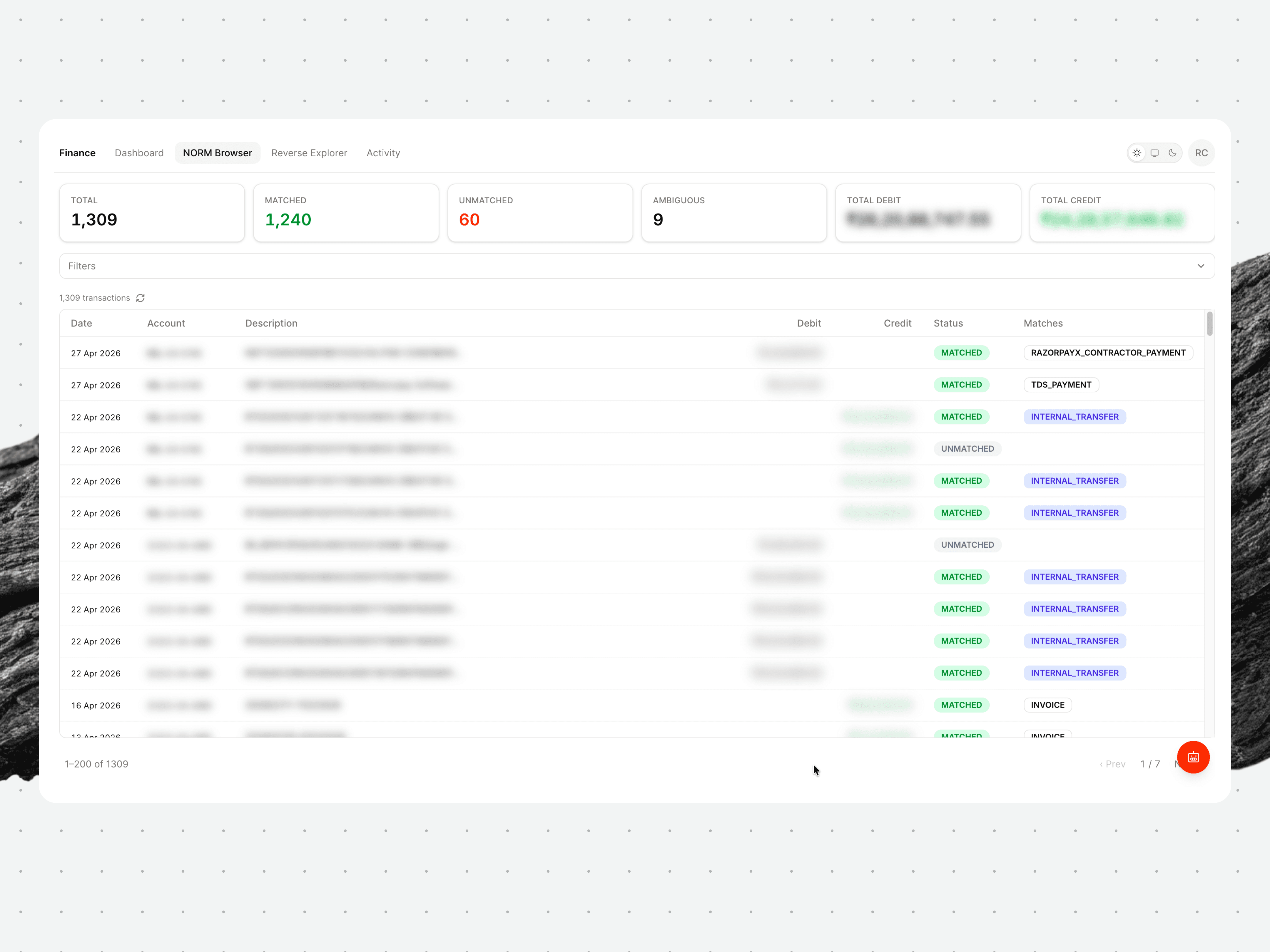
Every entry is matched to an invoice, payroll record or tax payment, and the unmatched ones show up on the counter bar at the top of the screen for review.
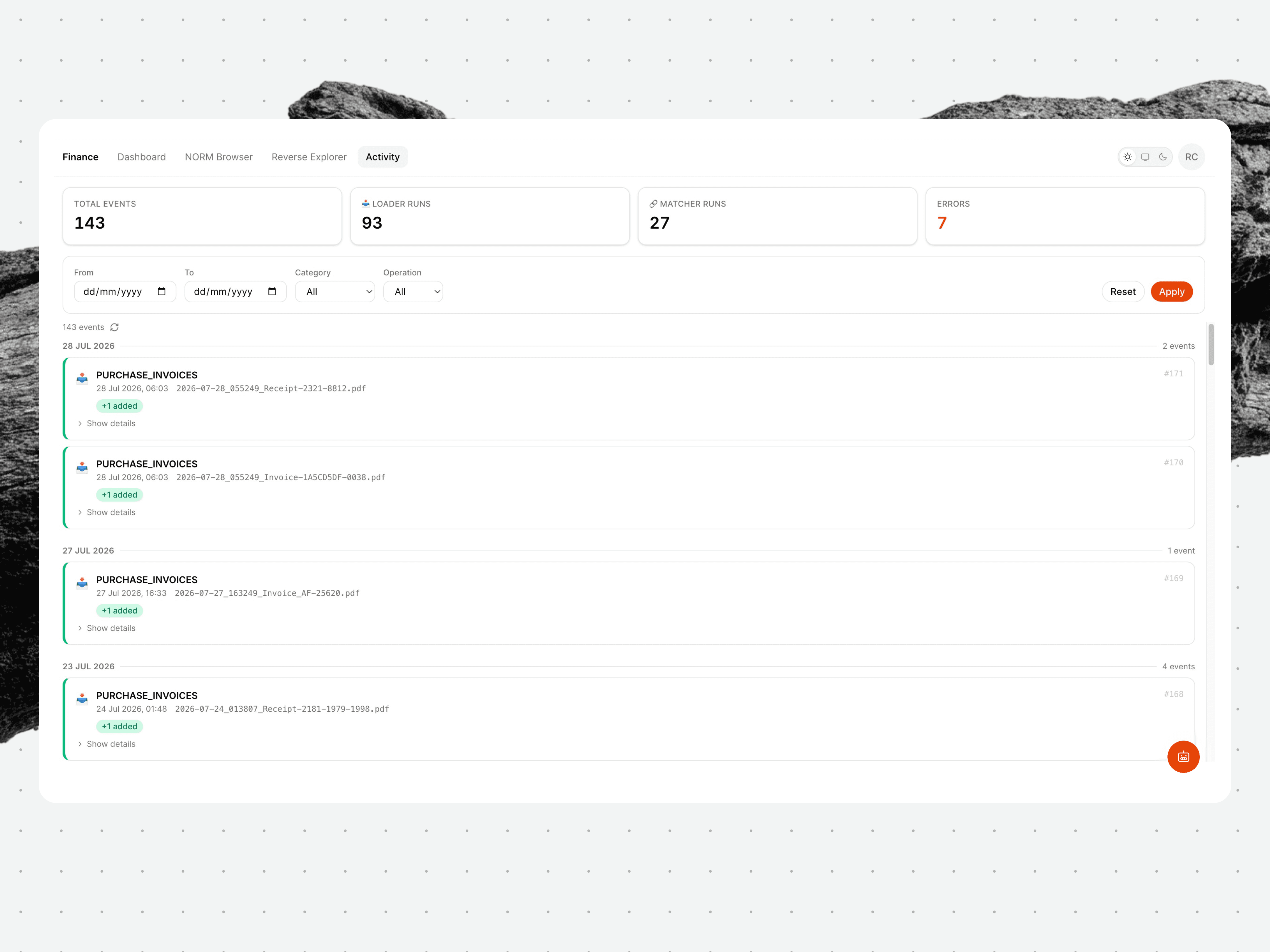
A timestamped log of every file the tool has processed, with totals and errors counted at the top.
What the tool does:
When bank and card exports are added, the app categorizes each entry and stores it in a consistent form. Scheduled jobs then match transactions to invoices, payroll records, reimbursements or tax payments.
If the matching rules miss an edge case, we review it manually. When the same kind of exception returns, the pattern is added to the rules so the next one can be handled automatically.
The current version follows money coming in through sales invoices and leaving through payroll, reimbursements and payments to vendors or contractors. Tax and compliance work, including GST, TDS, provident fund and professional tax, sits in the same system.
Because the records share a structure, the app can assemble reports and an agent can answer finance questions without somebody first searching across several platforms.
It uses the same Canvs account as our other internal tools, with separate permissions limiting access to financial data.
The next evolution of the tool involves simplifying data imports and adding reminders for work that still needs a person, in addition to offering recurring reports that will make changes easier to follow.
Forecasting is being built around the way Canvs operates. As actual figures arrive, agents will compare them with the forecast, giving the studio a month-by-month view of how the business is tracking.
8. Individual experiments within the studio
Alongside the systems being built for the studio, people at Canvs are developing smaller experiments around problems they encounter in their own work. The person making one already knows the awkward details, which gives the experiment a precise brief and somewhere real to be tested.
The results take different forms. Some become tools; others become tested approaches that a later project can pick up. Once shared, they give the rest of the studio a stronger place to begin when the same problem appears again.
Localising a design system for Indic scripts
While localizing a fintech product, Akhil Desai (Product Designer) found that Anek (an open-source typeface family by Ek Type) behaved differently across its 10 scripts: text centered in English could shift upward in Devanagari, while Tamil or Telugu copy could outgrow the space inside a component.
Adjusting the vertical spacing and checking the most demanding languages allowed the existing screens to support Indic text without being rebuilt.
The findings now sit in a shared Canvs reference within the studio’s existing localization practice, so future teams can draw on the project’s decisions and reasoning while the typeface, tokens and components are still easy to adjust.
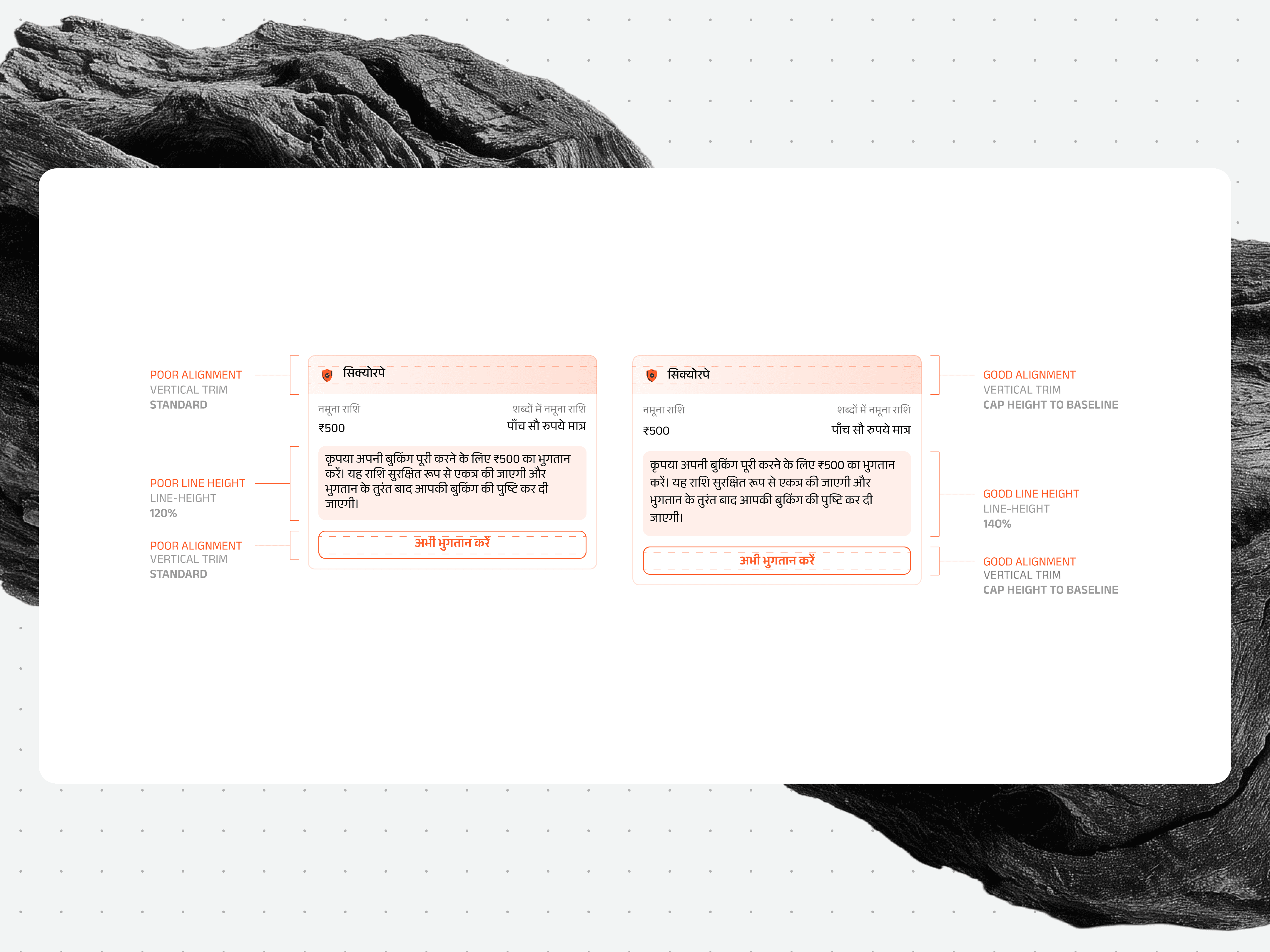
The same SecurePe card in Hindi, before and after: raising the line height to 140% and trimming from cap height to baseline gives the Devanagari room to sit properly.
From a design decision to a finished file
Once the first screens are in place, the team still has to carry the design decisions across the system and prepare a Figma file that another person can pick up. Hamsika has been building small tools for this part of the job, based on how we already design and hand work over at Canvs.
Design Helper
It is a growing suite of AI skills that works with whichever AI tool a designer already uses. The designer still decides what a component should be and when a variation deserves to stand on its own. The skill picks up from there.
It can suggest where to begin, break a screen into components, assemble a reference set in Figma, derive missing states and build related versions of an existing screen. Each step is proposed for approval, then built and checked. When the skill is unsure, it says so.
It draws on patterns from shipped design systems and can also retain the choices and reasoning particular to a project.
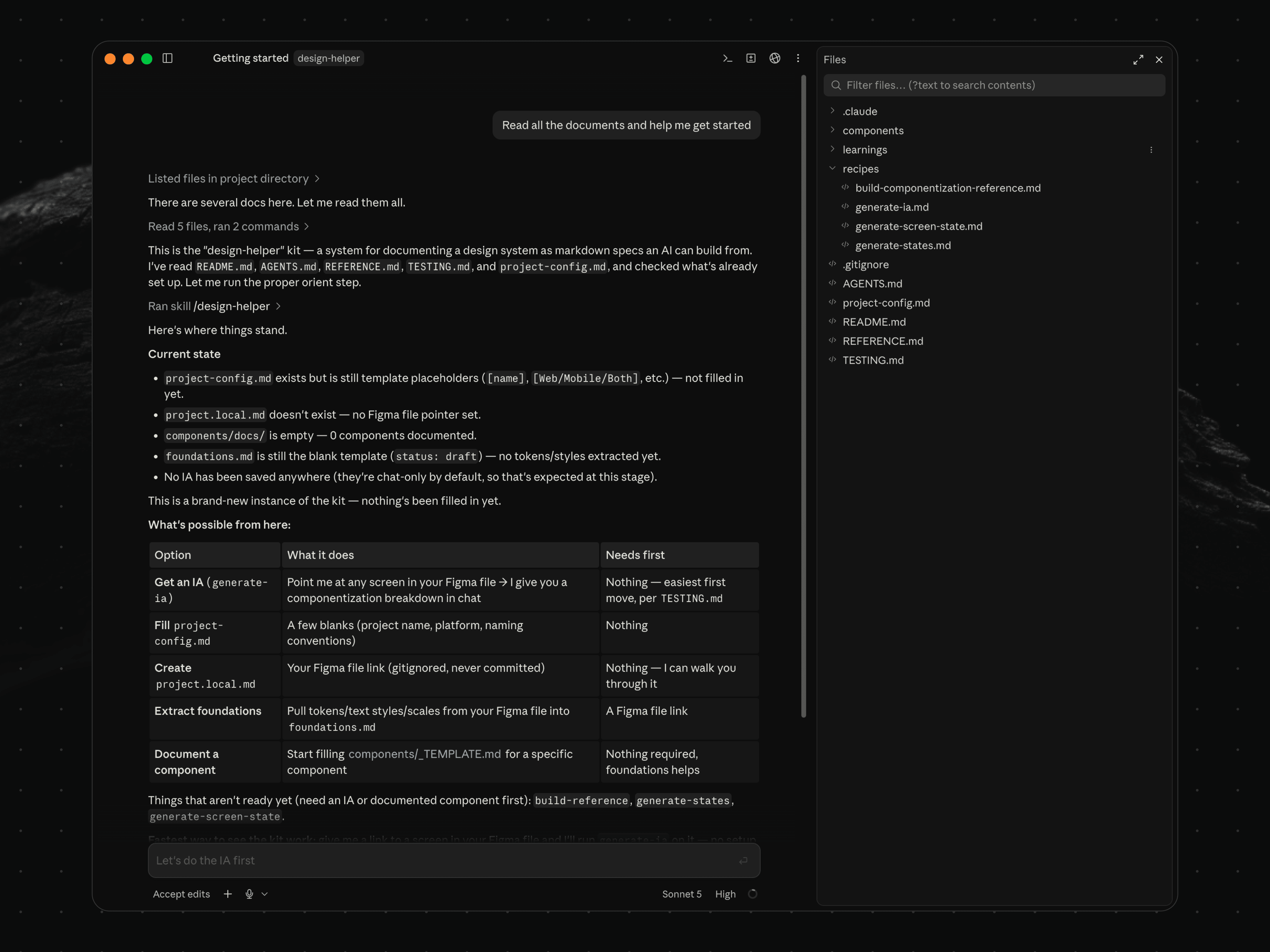
The Design Helper reads a project’s files and reports where things stand, then lays out what it can build next and what each step needs first.
Smart Rename
This deals with a smaller but familiar part of delivery. Canvs files follow a particular naming and numbering structure, which becomes laborious when a file contains 50 or 60 screens.
The Figma plugin numbers frames from their position on the canvas. Screens can be reordered without losing their step names, while repeated screens can be renamed together or carried across breakpoints.
Together, the two experiments make the decisions and conventions behind the work easier to carry from one screen, file and project to the next.
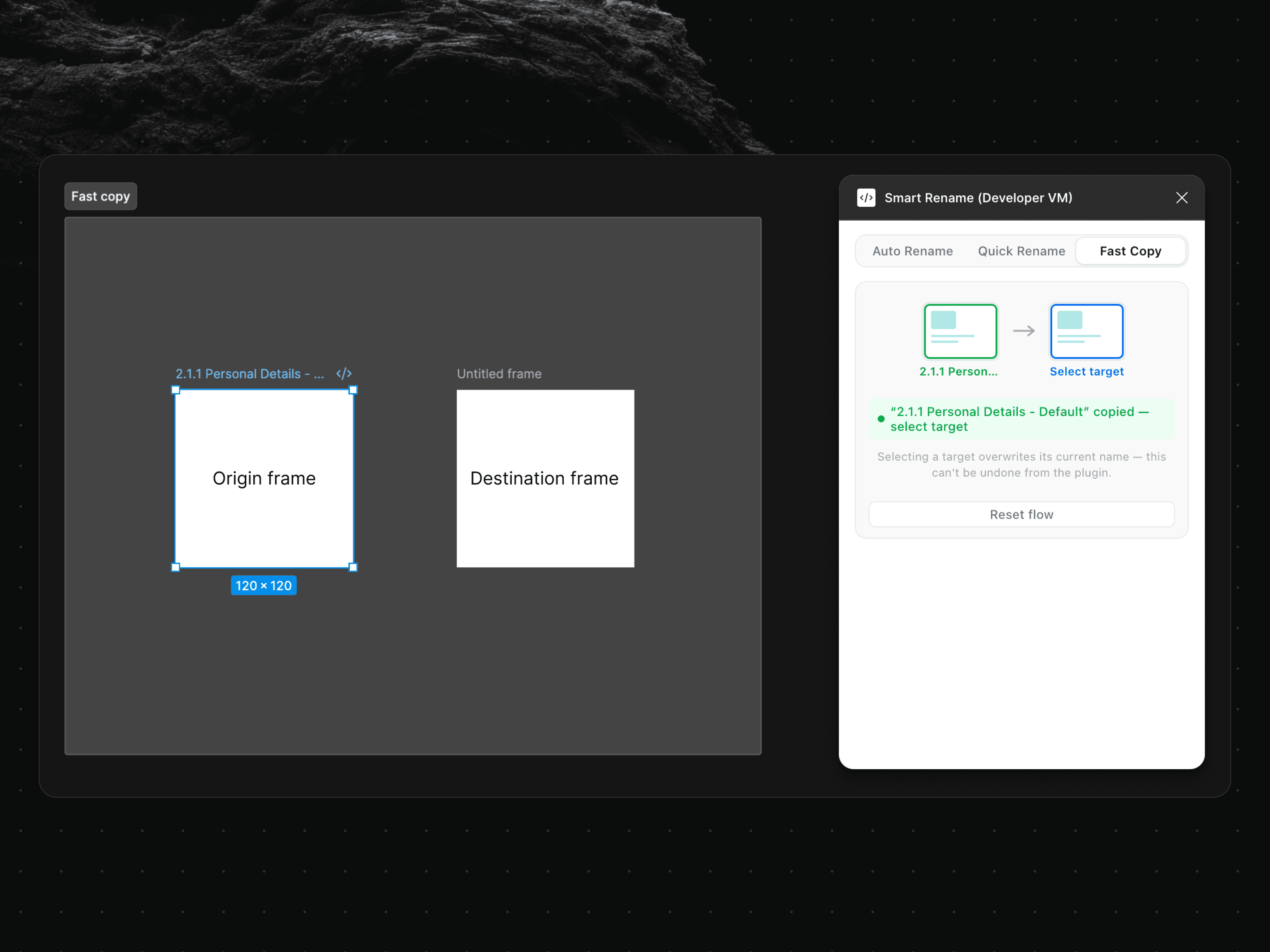
Fast Copy, one of Smart Rename’s modes, carries a frame’s name onto another screen, for the ones that repeat across breakpoints.
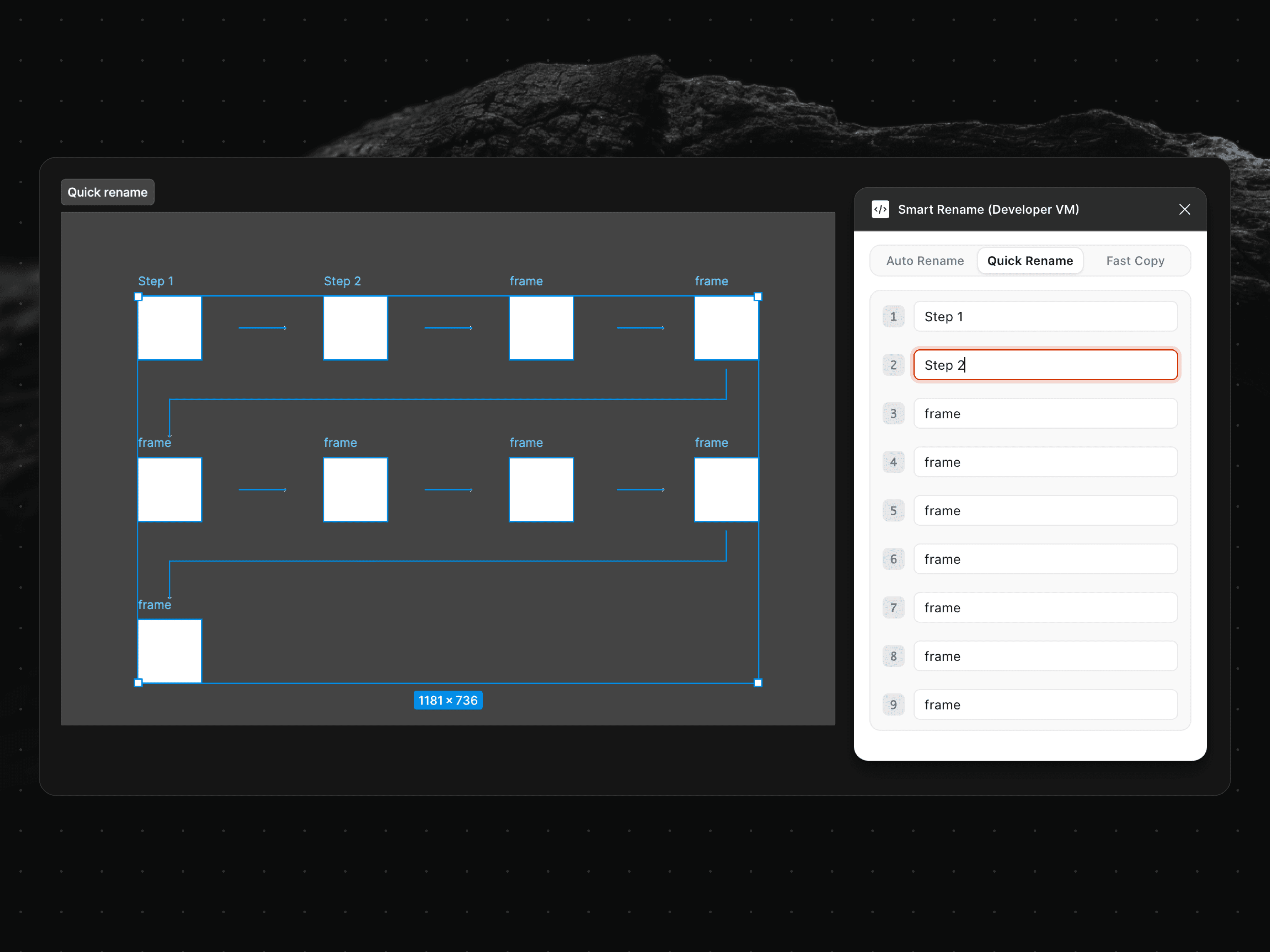
Quick Rename pulls every selected frame into a single panel, so a run of screens can be numbered in sequence without opening each on the canvas.
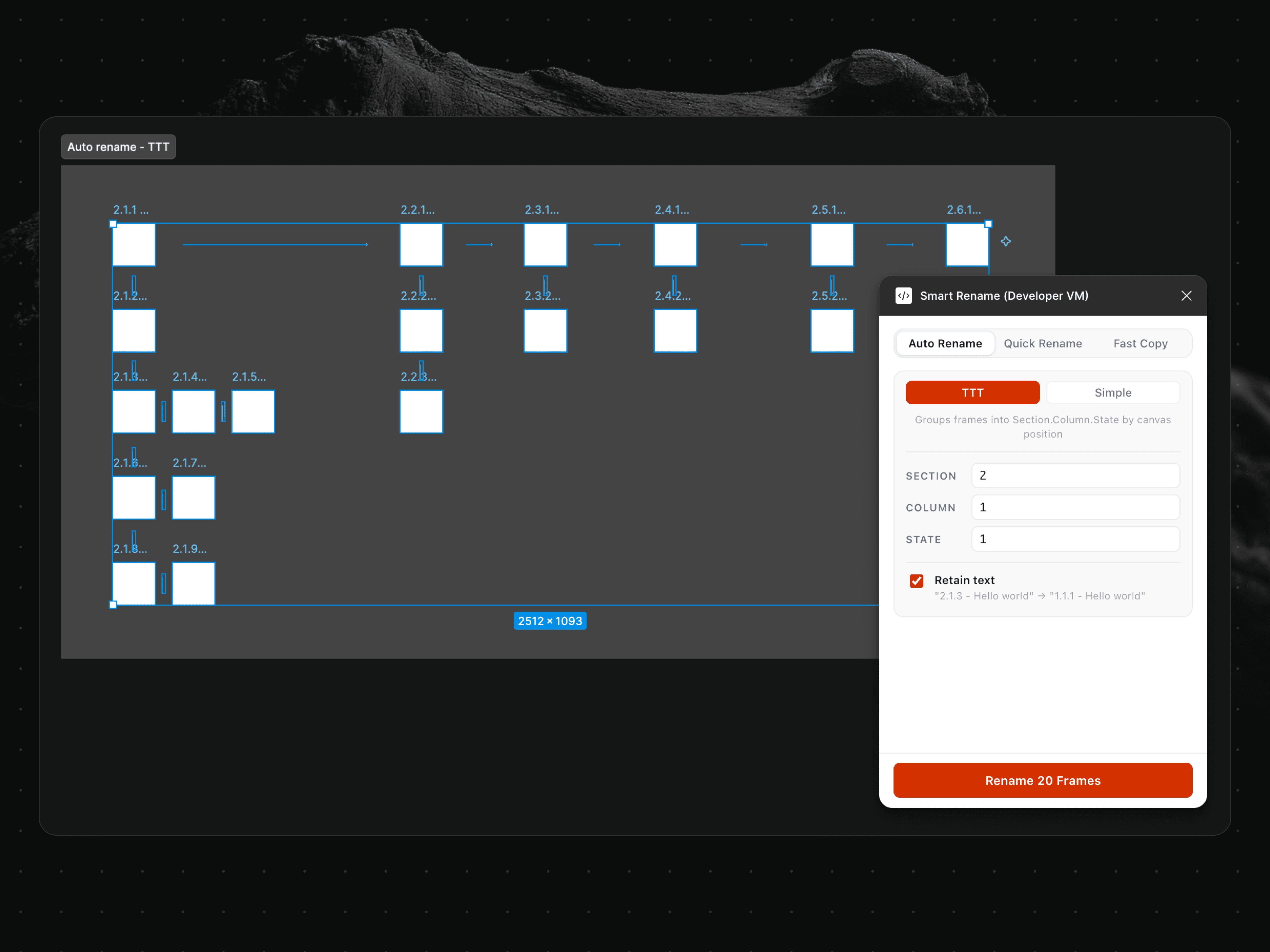
Auto Rename reads frames by their position on the canvas and numbers them Section.Column.State, the format Canvs delivery files follow.
Keeping everyday file work local
Small file jobs send us to browser tools all the time: merging a PDF, resizing an image, trimming a video or checking a block of JSON. Many of those tools begin by uploading the file, which makes them a poor fit for client material.
Himanshu wanted the same convenience with the processing kept on the machine. He built LocalKit, a browser-based collection of more than 50 utilities that requires no account or app installation.
It handles the things you usually open a one-off website for, from reorganizing PDFs and removing image metadata to converting video and formatting JSON. Every operation runs locally through WebAssembly, FFmpeg, PDF.js or the browser’s own APIs.
Once the site has loaded, the tools can work offline. A designer can compress a client PDF or remove metadata from an image without creating another copy somewhere outside the studio.
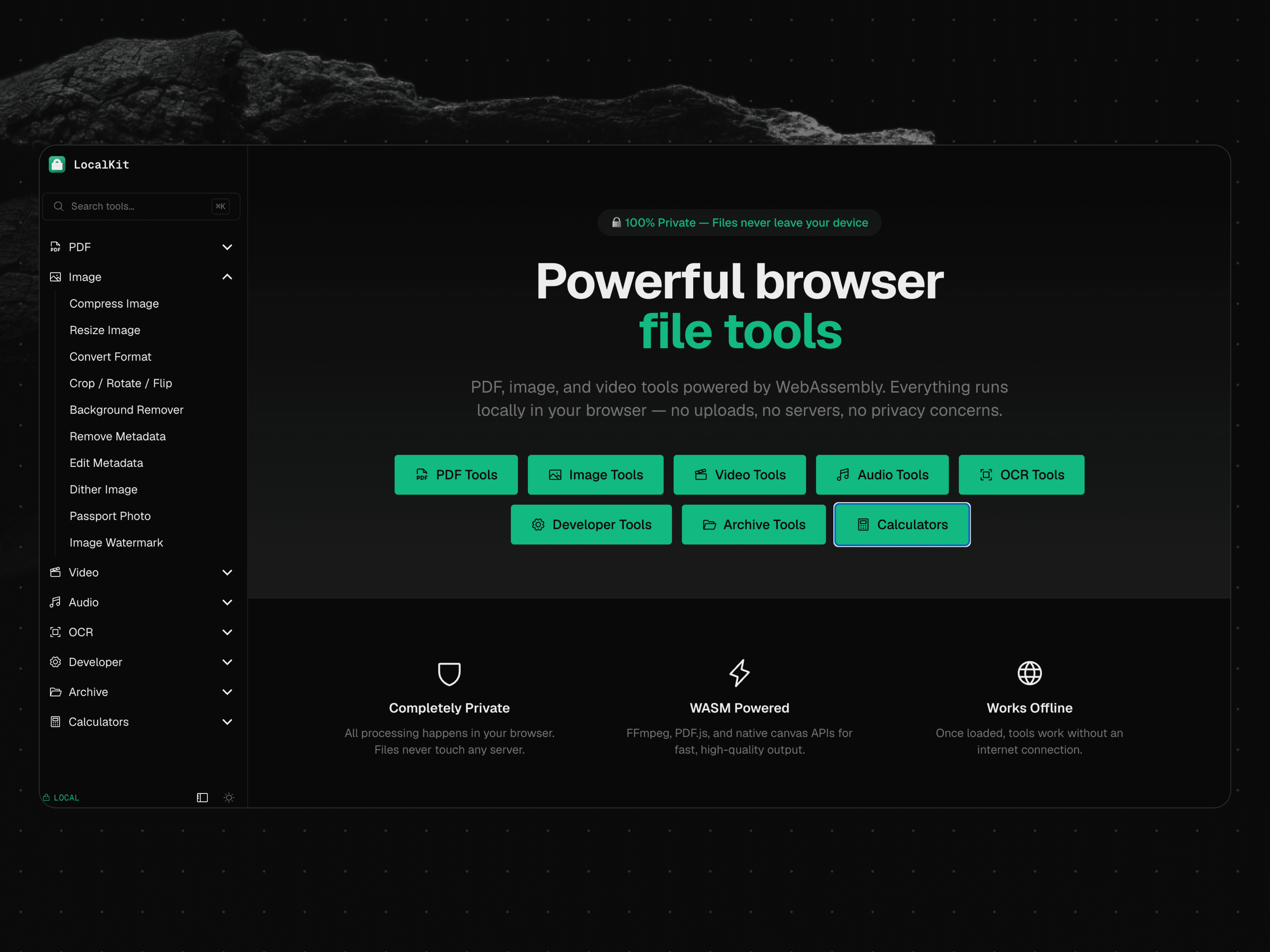
A look at LocalKit, a set of 50-plus file utilities that run entirely in the browser, keeping every operation on the machine with no uploads.
A practice open to evolution
Each internal tool is also a proposal about how the studio should work. Once other people begin using it, the assumptions inside it become easier to examine. A convention can be built into something usable and tried by colleagues. When a live project exposes what it missed, the convention can be revised; if it proves useful elsewhere, the shared infrastructure gives it somewhere to go.
This overview captures that process at one point in its development. In later pieces, we will stay with individual tools and workflows for longer, looking at the choices behind them and what changes as more people use them. We will also be sharing newer experiments along the way.
As these tools move between their makers and the wider studio, people at Canvs have a direct hand in shaping the conditions around their work. The systems around the work can receive the same attention as the work itself, from the people who understand both closely.