Years spent inside complex products leave a studio like ours with more than a portfolio. They build an instinct for where the difficult questions tend to appear, and a body of knowledge about how products behave once users, business rules and technical constraints enter the picture.
That knowledge becomes most valuable when it can enter a decision while the work is still taking shape. It may live in earlier research, a project history, a design system or the people who developed it.
Our agentic systems give these forms of knowledge a way to meet. They connect a current question with relevant context, investigate it further and carry standards already established by the studio into the tools where the work continues.
This applies whether we are pitching a new product or redesign, or already deep inside an engagement.
In either case, the work can draw on what Canvs has learned across projects, our understanding of the client, their domain and their business, and what becomes clearer as we examine the ask.
Agentic systems augment that process by carrying context forward, investigating specific questions and helping the team examine its directions more fully in the time available.
For this piece, we look specifically at the pitch process: how the studio brings its craft and agentic systems together to develop a clear position on what a new or redesigned product should do, how it should feel and whether the proposed experience holds together once someone moves through it.
1. Building context around an ask
The context around an ask begins accumulating as soon as we start discussing it. A client call may establish a business constraint, an internal review can raise a question worth researching and a later conversation may hold the reasoning behind a design choice. Together, these exchanges form a running account of how the work is taking shape.
Documenting those conversations and choices has long been part of how we work at Canvs. Our agentic setup builds on that habit by giving the material a common structure and keeping it connected to where it came from.
Project calls are transcribed and turned into structured notes that preserve what the team decided, the reasoning behind it and a route back to the original conversation. We explain the larger system in Putting the studio’s memory to work: Ambient intelligence at Canvs.
The three-stage flow from connected tools to shared context to human action.
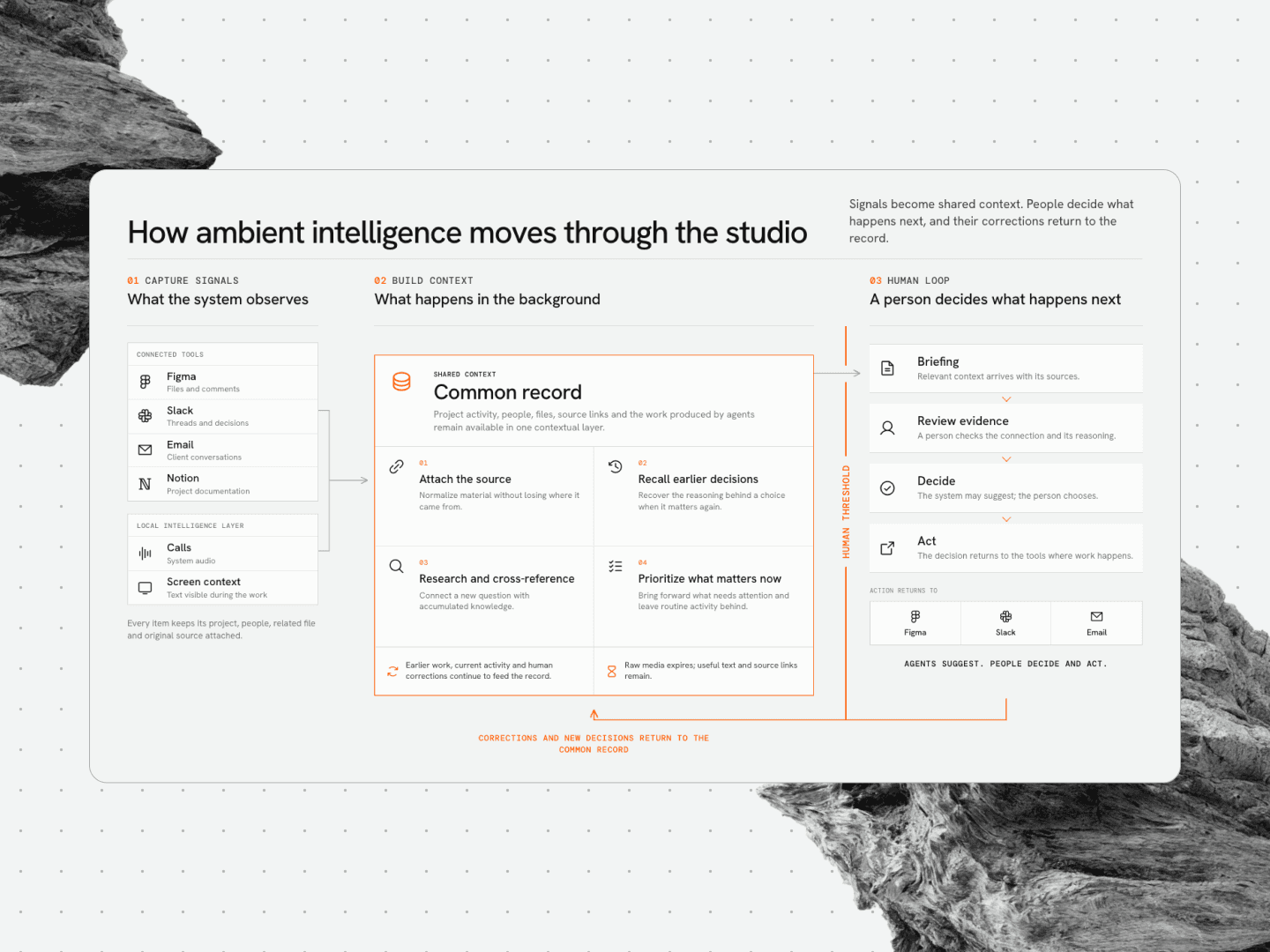
For instance, in a long-term engagement, the same setup works across years of project history. On one BFSI retainer, it holds 3.5 years of meeting notes, email threads and project decisions. If the same issue comes up again, the team can see what was decided earlier, why, and the original conversation it came from.
While such a record belongs to that particular engagement, the institutional knowledge we gain through work of this kind becomes part of the studio’s own understanding. It helps us recognize familiar questions and know where a new pitch needs deeper investigation.
2. Researching as the pitch develops
A pitch usually begins with broad questions about the business objectives and the people the product serves. More specific questions appear as the direction develops, often during a client conversation, an internal review or while the team is working through a flow.
When that happens, the question can enter the research system with the surrounding conversation and project context attached.
The system looks in 2 directions at once: through current sources for recent information, and through earlier research available to the team.
It searches by meaning, so relevant work can return even when it began on another project or was described in different language. New findings are compared with what we already know, allowing them to support an earlier conclusion or open another line of inquiry.
The research agent can check 1 month to 7 year old doc, and surface older findings that relate to the question at hand.

The next step is checking whether that material holds up. A plausible mistake can otherwise become part of the reasoning behind the interface.
On one banking project, an earlier note had described a one-device restriction as an RBI rule. When the research system revisited the claim, it found no RBI circular supporting it and traced the restriction to the bank’s own policy. The correction was crucial because a product policy and a regulatory requirement carry very different implications for the interface.
The RBI claim did not have any supporting evidence. Hence, the note is flagged for review.

Every first pass then goes through an adversarial review. Separate models examine the research for missing citations, outdated information and broad claims with little behind them. The final review belongs to the team: somebody must be able to trace a finding to its source and decide that the evidence is strong enough to use.
Agents are particularly useful for secondary research such as competitive intelligence, category trends, regulatory tracking and technical investigation.
Primary research continues alongside it. We speak with users, observe behavior and write our own notes because direct contact gives us evidence that cannot be found by searching existing material.
We explain how this research system works and accumulates knowledge in making each inquiry useful to the next: How research is now non-linear at Canvs.
By the time designers begin giving the direction form, the research has supplied a position to work from. The screens and flows will raise questions of their own, which can return to the same system while there is still time to adjust the direction.
3. Giving product direction a visual system
Once the team has a position to work from, we begin giving it form in the interface. We choose the type, color, hierarchy and interaction principles that determine how this particular product should look, feel and behave.
Before we build out the screens, those choices need to become a system that holds the interface together in Figma and gives the working prototype we later build in code the same foundation.
To set up that foundation, we use Omni, an internal suite of micro-tools that Arjun Rajkishore has been developing at Canvs. Its design-system tools draw on the studio’s guidance to turn those initial choices into something we can test and adjust much faster.
Omni picks your primary color and font and generates the full colour palette, type scale and tablet-and-mobile sizing rules, then sets up the Figma file for design.
Within a pitch, the workflow is fairly short:
Omni expands the chosen colors and typography into complete scales and basic tokens, including type sizes for different screens.
We preview these foundations on generic mobile, web and dashboard interfaces, and check the color pairings against accessibility standards.
An agent helps map the raw color tokens to semantic roles across light and dark modes.
The output moves into Figma, where the team reviews the mappings, makes corrections and continues designing.
At this stage, the groundwork is in place in Figma, and the team is designing the screens and building their components alongside them.
With Omni, that setup has gone from at least 3 or 4 hours of manual work to around 30 minutes of tweaking.
More importantly, it gives us a design system rather than a set of static screens for the next step.
4. Turning the proposed experience into a working prototype
With the design system in place, the next step is to make the proposed experience usable. We give a coding agent the designed screens as a visual reference, along with structured information about their components.
The first build carries decisions already made in Figma into code. Once we can move through it, we:
Find where its appearance or behaviour differs from what we intended.
Give the agent precise corrections to components, interactions and responsive behaviour.
Add recurring decisions to the project instructions so they carry into the screens that follow.
Take a proposed product with an agentic chat. A Figma click-through might connect the moment someone sends a message to another screen containing the completed reply.
In a coded prototype, stakeholders can experience how it feels while sending a message, waiting for a response and watching the reply appear word-by-word.
In the coded prototype, the request can be sent, the interface can show that it is working and the reply can appear word by word. Someone can also backtrack or take another route without the presentation having to restart.
Here, high fidelity describes the experience: how closely the prototype reproduces the product’s intended appearance, movement, timing and response.
Production engineering remains a separate stage. We explain this standard, and the workflow behind it, in our two-part series on why coded prototypes are now our default and how we build them.
Coming back to the process, when we present the pitch, the client team can use enough of the proposed product to judge whether the idea, interface and behaviour hold together. The parts between the screens are now present in the work rather than left to explanation.
The agentic health assistant we conceptualised for one of India's health insurance providers was built this way, from a research finding about unused policyholder data through to a working prototype. We walk through the workings of that health assistant in Inside a Canvs build: An agentic health assistant.
Taking an exacting pitch process further
We have always treated a pitch as design work in its own right. It receives the same attention to the business, the product idea and the details of the interface that we bring to an engagement once it begins.
Agentic systems extend what we can do within that process. They reduce the time spent retrieving context, assembling foundations and reproducing resolved work.
It gives the team more room to investigate a question, sharpen the direction and stay with the details that matter.
Within the time available for a pitch, we can give more of the proposed product our full attention and take it far enough for the client to examine properly. That additional reach is what agentic systems bring to an already rigorous process.